



Jump to content
View in the app

A better way to browse. Learn more.

OSBot :: 2007 OSRS Botting

A full-screen app on your home screen with push notifications, badges and more.

To install this app on iOS and iPadOS
  1. Tap the Share icon in Safari
  2. Scroll the menu and tap Add to Home Screen.
  3. Tap Add in the top-right corner.
To install this app on Android
  1. Tap the 3-dot menu (⋮) in the top-right corner of the browser.
  2. Tap Add to Home screen or Install app.
  3. Confirm by tapping Install.

Repload

Members
  • Joined

  • Last visited

  1. Hey just some feedback on the spec. It still doesn't really do it often
  2. Will filters on the mage book to make the icon bigger affect the bot when using npc contact? Can you send me the settings to. I'm currently 82
  3. Can I get a trial please
  4. When does 1.572 come out?
  5. I've ran this script for a while now. Noticed it doesn't do the dragon axe special. Am I missing something?
  6. can I get a trial?
  7. trial please
  8. can I get a trial please
  9. script doesn't work. Won't make any of the options.
  10. Still doesn't run. Rip script.
  11. trial please
  12. Repload replied to Czar's topic in Agility
    does it do brimhaven agility arena?
  13. Repload replied to Czar's topic in Agility
    can I get a trial
  14. Repload replied to Apaec's topic in Agility
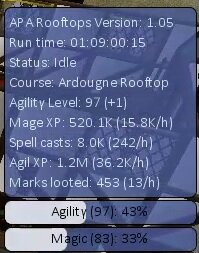
    I'm really enjoying this script almost 99. Ran it for over a day with some moderate brakes. I had to stop it though because I ran out of alching supplies so I paused it to go buy some more, I came back to the area and resumed, it just ran the course without alching so I restarted it. Not an issue just something I found interesting.
  15. Repload replied to Apaec's topic in Agility
    Ran for 10+ hours and love the alch feature worth the purchase.

Account

Navigation

Search

Configure browser push notifications

Chrome (Android)
  1. Tap the lock icon next to the address bar.
  2. Tap Permissions → Notifications.
  3. Adjust your preference.
Chrome (Desktop)
  1. Click the padlock icon in the address bar.
  2. Select Site settings.
  3. Find Notifications and adjust your preference.
