





justsandro
Members
-
Joined
-
Last visited
-
justsandro changed their profile photo
-
Hey bro , i appreciate you giving me a 24 hr trial yesterday or the day before (forgot when) But i was unable to play any rs due some family issues unfortunately . Can i ask you for a trail once again or will you not allow it ? Thanks anyways man i love your scripts
-
-
Can i get Agility trial for 24hrs bro ? Appreciate it !
-
Whenever i start this script instead of displaying the profit it says "-xxxx profit" since i'm not making any loss it should not display such thing. Any idea why this is happening all of a sudden ?
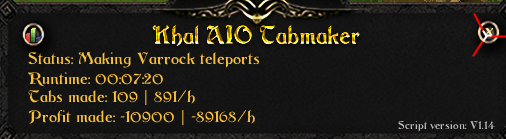
-
I only see one out there ?
-
Is teleporting also added in this script ? if so that would be amazing
-
Perfect Runecrafter trial please thanks ! @Czar
-
@Czar can i have a trial please ?
-
Hey nice script bro appreciate the effort ! How about a pray flick option in the next update ? or is that too difficult ?
-
Hello , could i get a trial test before buying the script ? thanks
-
Were you able to fix this by now ? Because i'm sitting here with the same exact problem..
-
Is this script on SDN ?
-
Same thing here , just got the "your account is disabled" message , i was logged in lol guess they kicked me (logged out) and banned me. 2nd time banned , on 2nd account , im done with jagex and botting lol
-
Well , read this too late gf account im qutting lol
-
Can i have a trial ? Considering to purchase afterwards



