






dlaw1990
Members
-
Joined
-
Last visited
Everything posted by dlaw1990
-
You're prob right. Okay ill give that a try.
-
https://imgur.com/c50ArcX So when I go afk for an hour or so, the script doesn't stop but I come back to the client disconnected. Anything I can do for this? @Czar Mirror mode btw.
-
Im interested in the account if you can figure out a price for it. Feel free to hit my DM's.
-
Script is broken
-
I meant for the fossil island fix.
-
Any update on this?
-
Would be great if you can add the butler + PVP world plank make method.
-
Awesome, cheers!
-
@Czar Script is broken for fossil island teaks. It just keeps walking around and get stuck on crabs nearby. Please take a look.
-
@Khaleesi The script no longer logs out upon using up all available glass on glassblowing. This is quite dangerous, please implement that auto logout.
-
@FrostBug I have the script, but going to use it on an iron at Jad. Does it support food or is it brews only?
-
Hey mate, does it support sandstone mining into the sand grinder?
-
hmmm i agree i just started with a new account on previously flagged IP (ip where it has had previous bans on), created an account, waited 2 days, did a manual quest on it, paid members, did sand crabs for 2-3 hours and next day banned.
-
was there an update on tutorial island? getting stuck at the first part clicking the settings gear.
-
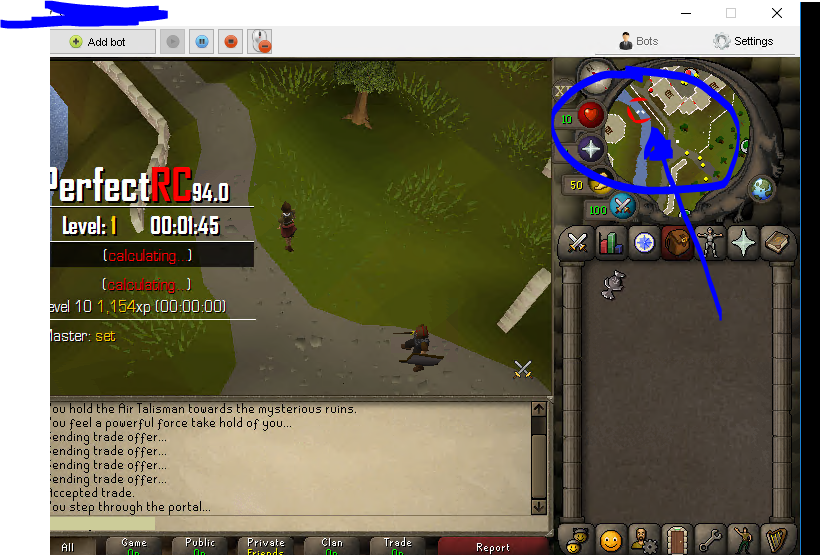
Does anyone have a guide for using this as a fresh account doing rune runner? which is the best way about doing this for rune runner only? edIT: bought the script but my worker keeps logging off once they reach to the alter (doesnt go in) or trade outside of it either. Edit: going to try to do the RC lvl 1 quest for worker. edit: requires rc lvl 1 quest, requires talisman to get in? even tho my worker has a tiara? (not that it matters since my main only has 27 spots) Results: works smooth af. Cant wait for higher lvls. on a second note is it possible to run this with multiple accounts or is it going to get very suspicious running from the same IP? The setup for a runner does take awhile, questing, giving them note of runes. etc Edit on the 4th run, it does not run to the bank properly. it keeps missing the edge of the minimap causing the bot to be stuck (clicks on the lake when doing air rune runs) @czar
-
is the runner easy to setup? looking for a trial first
-
Hey guys any chances of ur main getting banned using any runner? or just the runner lol
-
-
For me its bugged cannot get past the moving arrow keys, just purchased.
-
Anyone planning on making a vorkath bot?
-
Can confirm this is also a problem.
-
@Khaleesi Can you please fix paying the foreman? It's not pressing yes to pay 2500 gp then keeps spamming the foreman.
-
It's not paying the foreman currently @Khaleesi, just spams the foreman but doesn't say yes to paying 2.5k. I've had this since 2015, it's pretty good still i must say!
-
From my experience, if you're not looking some Venezulan gold farmer with mystic and low stats, you are much less likely to get caught.
-
Looks like it. Also TS: https://twitter.com/PaizuriRS/status/1042891317892796419

