






yoyi3001
Members
-
Joined
-
Last visited
Everything posted by yoyi3001
-
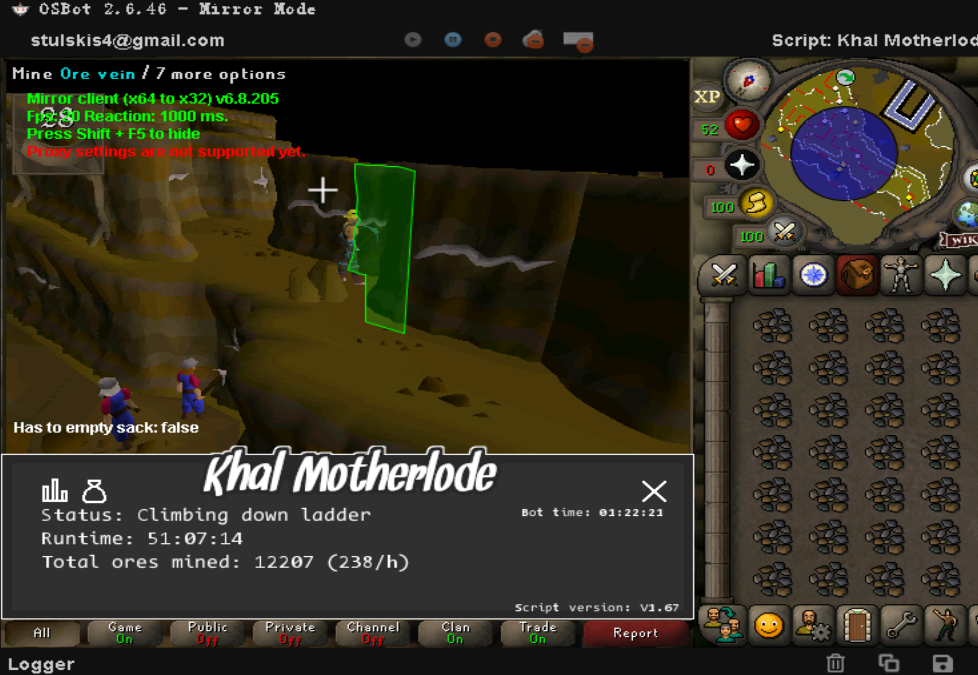
thanks for your reply maybe its not because of the damn camera, i tried all the camera ,it is just need more step to the ladder,maybe it is a bug of the game, you can click the ladder but cant get down when you are far away from it
-
it is a real AFK when AFK at 500 points until end of the game and disconnected from the server and cant login again would u make it dont drop from the game when AFK
-
always stuck at climing down ladder it need run more step to the ladder and then click at it
-
would u add Bagged plants please?
-
how can i use new Dev build client? i got the same problem catching black chins, it did not teleport to edge but run a such long way to edge after the death
-
would you add restock for the script please?
-
how can i use CLI? edit czar_blaster.cfg?
-
how can i save the setting please? would it load the last setting for default?
-
[INFO][04/28 07:56:29 下午]: Welcome to OSBot 2.6.46! [INFO][04/28 07:56:30 下午]: Loaded 1 RS accounts! [INFO][04/28 07:57:06 下午]: Updated injection hooks for client revision : 204! [DEBUG][Bot #1][04/28 07:57:06 下午]: Initializing mirror client bot... [INFO][04/28 07:57:06 下午]: Started bot #1 [INFO][Bot #1][04/28 07:57:17 下午]: Initializing 39 API modules... [INFO][04/28 07:57:36 下午]: Script list refreshed and loaded 4 scripts. [INFO][Bot #1][04/28 07:57:44 下午]: Loaded 4 built-in random solvers! [INFO][Bot #1][04/28 07:57:44 下午]: Setting Antiban Compliance Seed with bytes: [106, 111, 115, 104, 103, 114, 101, 101, 110, 104, 105, 64, 104, 111, 116, 109, 97, 105, 108, 46, 99, 111, 109, 56, 101, 101, 97, 57, 98, 48, 56, 45, 100, 53, 48, 57, 45, 52, 51, 50, 52, 45, 56, 97, 48, 101, 45, 55, 51, 97, 54, 55, 48, 57, 51, 102, 52, 48, 100] [INFO][Bot #1][04/28 07:57:44 下午]: Adjusting loop speed 50 ms [INFO][Bot #1][04/28 07:57:44 下午]: Setting script name: Excellent Dragons [INFO][Bot #1][04/28 07:57:44 下午]: Created or save directory exists. [INFO][Bot #1][04/28 07:57:44 下午]: Created log save file[Excellent Dragons2022-04-28 19-57-44.log]: true in C:\Users\Administrator\OSBot\Data\Excellent Dragons\logs [INFO][Bot #1][04/28 07:57:44 下午]: 3826 = Price Cache Size [INFO][Bot #1][04/28 07:57:44 下午]: Displaying GUI [ERROR][Bot #1][04/28 07:57:44 下午]: Blocked permission: ("java.io.FilePermission" "ShellFolder: 0x11" "read") [INFO][Bot #1][04/28 07:57:44 下午]: Terminating script Excellent Dragons... [INFO][Bot #1][04/28 07:57:44 下午]: Moneymade: 0 [INFO][Bot #1][04/28 07:57:44 下午]: Sending....data.. [INFO][Bot #1][04/28 07:57:44 下午]: Bones: 0 [INFO][Bot #1][04/28 07:57:44 下午]: Hides: 0 [INFO][Bot #1][04/28 07:57:44 下午]: Visage: 0 [INFO][Bot #1][04/28 07:57:44 下午]: 0 [INFO][Bot #1][04/28 07:57:44 下午]: Sending data for user: Yoyi3001 [INFO][Bot #1][04/28 07:57:46 下午]: 6<br>Yoyi3001<br>0<br>0<br>0<br>0<br>0<br>You are missing some parameters. [INFO][Bot #1][04/28 07:57:46 下午]: Sent data to server: true [INFO][Bot #1][04/28 07:57:46 下午]: Script Excellent Dragons has exited! did not work

