Heist
Java Lifetime Sponsor
-
Joined
-
Last visited
Everything posted by Heist
-
Bump
-
bump
-
Bump
-
Bump
-
Taking offers
-
Still up
-
Taking offers
-
Taking offers
-
Still up
-
Taking offers
-
Bump
-
Online
-
Bump
-
Bump
-
Bump
-
Bump
-
-
Want to buy obby tank for 20m
-
hm for obby?
-
Taking offers
-
-
-
Still up?
-
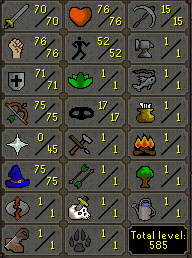
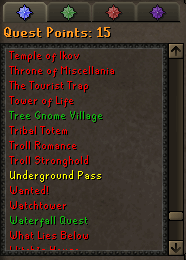
1. Pictures of the account stats 2. Pictures of the total wealth (if there is any) Theres like 500k on the account. 3. Pictures of the quests completed 4. The price you will be starting bids at No bidding. 5. The A/W (Auto-win) for your account Auto-Win is 20m. 6. The methods of payment you are accepting I am accepting GP and BTC as payment. 7. Your trading conditions I will go first only if trusted. If not, you can go first or we can use a MM. 8. Pictures of the account status 9. Original/previous owners AND Original Email Address Original owner is Chef Sk1llz. Previous owner is Dibmeister. Discord will be the fastest way of communication. My discord is Heist#8285

-