
Cloxygen
Scripter II
-
Joined
-
Last visited
Everything posted by Cloxygen
-
Its a button, did you click it?
-
-
there is one, top right corner
-
I think I fixed the tile issue, you should now return to the tile you started on (when the script is next updated).
-
Thanks for the feedback. This should be fixed next time the script is updated
-
It should already support mining guild. if it doesn't for you, can you send me specifics and ill try to see why Edit: the script will work in all parts of the mining guild whenever the update goes through.
-
This script is now available on the SDN.
-
-
-
Is it me or is this way over complicated? This is what I use... private Area closestBank; public void onStart() { closestBank = getClosestBank(); } private Area getClosestBank(){ Area SHILOBANK = new Area(new Position(2854,2957,0),new Position(2850,2951,0)); Area PORTSARIMBANK = new Area(new Position(3047,3233,0),new Position(3043,3237,0)); org.osbot.rs07.api.map.Area[] bankAreas = { Banks.AL_KHARID, Banks.ARCEUUS_HOUSE, Banks.ARDOUGNE_NORTH, Banks.ARDOUGNE_SOUTH, Banks.CAMELOT, Banks.CANIFIS, Banks.CASTLE_WARS, Banks.CATHERBY, Banks.DRAYNOR, Banks.DUEL_ARENA, Banks.EDGEVILLE, Banks.FALADOR_EAST, Banks.FALADOR_WEST, Banks.GNOME_STRONGHOLD, Banks.GRAND_EXCHANGE, Banks.HOSIDIUS_HOUSE, Banks.LOVAKENGJ_HOUSE, Banks.LOVAKITE_MINE, Banks.LUMBRIDGE_LOWER, Banks.LUMBRIDGE_UPPER, Banks.PEST_CONTROL, Banks.PISCARILIUS_HOUSE, Banks.SHAYZIEN_HOUSE, Banks.TZHAAR, Banks.VARROCK_EAST, Banks.VARROCK_WEST, Banks.YANILLE,SHILOBANK,PORTSARIMBANK }; Area closestBank = null; for (int i = 0; i < bankAreas.length; i++) { if (closestBank == null) { closestBank = bankAreas[i]; } else if (myPosition().distance(bankAreas[i].getRandomPosition()) < myPosition().distance(closestBank.getRandomPosition())) { closestBank = bankAreas[i]; } } return closestBank; }
-
by default the client should automatically dismiss random events you don't have to write any code for it to work. If its not doing it, you can enable it in the options
-
you can do it with an array of strings and just store the names of each object or you can use a linked list and store the items as rs2objects. I would probably just store the names. You also need a case if you run out of items in the bank, like end the script or buy more items from the ge.
-
u know there is a built in random event handler right?
-
You want to check if your the bank contains your players position in a separate if statement, so you can else it with a walk to bank function and nest the isopen() check inside that. if(bank.contains(myPlayer())){ if(bank.isopen()){ depositall(); } else openbank(); } else walktobank(); also for withdrawing items I would just type the string of the item name, unless you have a reason for it? getBank().withdraw("Ring of dueling", 1);
-
Thanks for the reply. Is this new that local resources don't work?
-
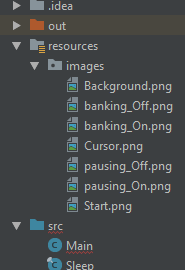
Last time I touched this script there was no trouble, that was like 6 months ago. For some reason trying to load local resources returns null no matter what I try. (I've read through the forums and practically every google result, nothing has worked so far.) private Image bg; private Image bankPaintOn; private Image bankPaintOff; private Image startButtonimg; private Image cursor; @Override public void onStart() { bg = getImage("images/Background.png"); bankPaintOn = getImage("images/banking_On.png"); bankPaintOff = getImage("images/banking_Off.png"); startButtonimg = getImage("images/Start.png"); cursor = getImage("images/Cursor.png"); } private Image getImage(String path) { Image img; try{ img = ImageIO.read(this.getClass().getResourceAsStream(path)); return img; } catch(IOException e){ log(e); return null; } } [ERROR][Bot #1][04/03 07:46:26 PM]: Error in script onStart(): java.lang.IllegalArgumentException: input == null! at javax.imageio.ImageIO.read(Unknown Source) at Main.getImage(Main.java:604) at Main.onStart(Main.java:208) at org.osbot.rs07.event.ScriptExecutor.IiIiIiiiiIII(em:105) at org.osbot.rs07.event.ScriptExecutor.start(em:234) at org.osbot.ub.run(bx:36) at java.util.concurrent.ThreadPoolExecutor.runWorker(Unknown Source) at java.util.concurrent.ThreadPoolExecutor$Worker.run(Unknown Source) at java.lang.Thread.run(Unknown Source)
-
The script is not currently working
-
-
keeps your methods secret and supposedly less banrate
-
This is how I was implementing a mouse listener for ore selection, but in the current release this no longer works. Any pro tips on how I should doing this?
-
wow i feel dumb, thanks
-
This Works: private MouseListener clickListener = new MouseListener() { @Override public void mouseClicked(MouseEvent e) { if (startButton.contains(e.getPoint())) { started = true; } else if (!started) { for (int i = 0; i < selectedTrees.size(); i++) { if (selectedTrees.get(i).getModel().getBoundingBox(selectedTrees.get(i).getGridX(), selectedTrees.get(i).getGridY(), selectedTrees.get(i).getZ()).contains(e.getPoint())) { selectedTrees.remove(selectedTrees.get(i)); return; } } for (int i = 0; i < nearbyTrees.size(); i++) { if (nearbyTrees.get(i).getModel().getBoundingBox(nearbyTrees.get(i).getGridX(), nearbyTrees.get(i).getGridY(), nearbyTrees.get(i).getZ()).contains(e.getPoint())) { selectedTrees.add(nearbyTrees.get(i)); return; } } } } @Override public void mousePressed(MouseEvent e) { } @Override public void mouseReleased(MouseEvent e) { } @Override public void mouseEntered(MouseEvent e) { } @Override public void mouseExited(MouseEvent e) { } }; This Doesn't: public void onPaint(final Graphics2D g) { if (choppingArea.contains(myPlayer())) { //Paints nearby trees if (!started) { g.setColor(Color.WHITE); g.drawString("PLEASE SELECT ORE.", 195, 305); g.setColor(Color.GRAY); for (int i = 0; i < nearbyTrees.size(); i++) { checkTree = nearbyTrees.get(i); model = checkTree.getModel(); g.draw(model.getBoundingBox(checkTree.getGridX(),checkTree.getGridX(),checkTree.getZ())); } g.drawImage(startButtonimg, 645, 452, null); } g.setColor(Color.WHITE); for(int i = 0;i < selectedTrees.size();i++){ if(selectedTrees.get(i) != null){ checkTree = selectedTrees.get(i); model = checkTree.getModel(); g.draw(model.getBoundingBox(checkTree.getGridX(),checkTree.getGridX(),checkTree.getZ())); } } }
-
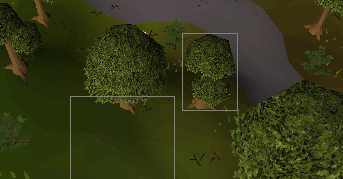
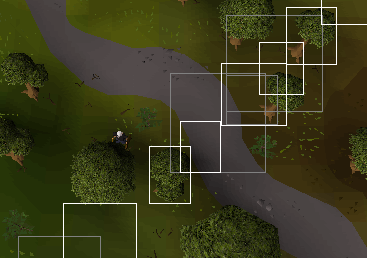
For some reason the paint for bounding box is off. I used the same code for detecting clicks inside the bounding box and that works in the correct positions, but the paint is offset from the actual. Would anyone know why? Edit: They seem to be lining up diagonally
-
I rewrote a bunch of stuff, and working on moving it to the SDN. I will update this thread when its ready.
-
private final LinkedList<MousePathPoint> mousePath = new LinkedList<>(); public void onPaint(final Graphics2D g) { while (!mousePath.isEmpty() && mousePath.peek().isUp()) mousePath.remove(); Point clientCursor = getMouse().getPosition(); MousePathPoint mpp = new MousePathPoint(clientCursor.x, clientCursor.y, 300); //1000 = lasting time/MS if (mousePath.isEmpty() || !mousePath.getLast().equals(mpp)) mousePath.add(mpp); MousePathPoint lastPoint = null; for (MousePathPoint a : mousePath) { if (lastPoint != null) { g.setColor(Color.WHITE); g.drawLine(a.x, a.y, lastPoint.x, lastPoint.y); } lastPoint = a; } }