






Deceiver
VIP C++
-
Joined
-
Last visited
Everything posted by Deceiver
-
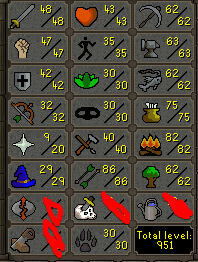
@Jackthedon do u want ur name in it or no@Realist doesnt need idwhy not combine themhttps://osbot.org/forum/topic/137257-styxafker-free/i got a 2 day on my fletcherif i have a boy im naming him after one of my bros1. Pictures of the account stats 2. Pictures of the login details 3. Pictures of the total wealth (if there is any) 4. Pictures of the quests completed Account has like 95% of the stats required to get Barrows gloves 5. The price you will be starting bids at 25M 6. The A/W (Auto-win) for your account 40M 7. The methods of payment you are accepting gp only 8. Your trading conditions u first 9. Pictures of the account status 10. Original/previous owners AND Original Email Address im oo, email will be changed to yours
 https://osbot.org/forum/leaderboard/?time=todayrip johnny91 QP, no worthy untradables, quested combat stats, no bans, im oo.https://www.howtogeek.com/337360/how-to-remap-an-xbox-one-controllers-buttons-in-windows-10/for creating new accounts, for botting on an already made acc for barrows/zulrah/etc, no just a regular socks5 is fineenable it in ur rs settings and the client will do it automaticallynooooooooooooooooooooooooooooooothink u mean proxiesin the actual rs screen where u login lol it says remember username xd




