






xyxyxyx
Members
-
Joined
-
Last visited
-
Looks very nice, can I have a trial?
-
Hey, can I have a trial?
-
Hey, can I have a trial?
-
Seems interesting, does this have automatic ge restocking and selling supplies?
-
I've got the reqs for the mole now, can you give me a trial?
-
Very cool, do you have an expected date for that? would love to req a trial at that point and probably purchase the script
-
Will this bot get ge restocking in the future?
-
Mate I made a mistake, I requested a trial but I just now see that I do not have a account with hard fally diary. Can you revoke my trial for now so that I can request it again later?
-
Hey, can I have a trial?
-
Where cann I get this? Can you auth me?
-
Hey, can I get a trial?
-
[INFO][Bot #1][01/01 06:48:45 PM]: WARNING - Failed to interact with Altar [INFO][Bot #1][01/01 06:48:45 PM]: WARNING - Failed to interact with Altar [INFO][Bot #1][01/01 06:48:45 PM]: WARNING - Failed to interact with Altar [INFO][Bot #1][01/01 06:48:45 PM]: WARNING - Failed to interact with Altar [INFO][Bot #1][01/01 06:48:45 PM]: WARNING - Failed to interact with Altar
-
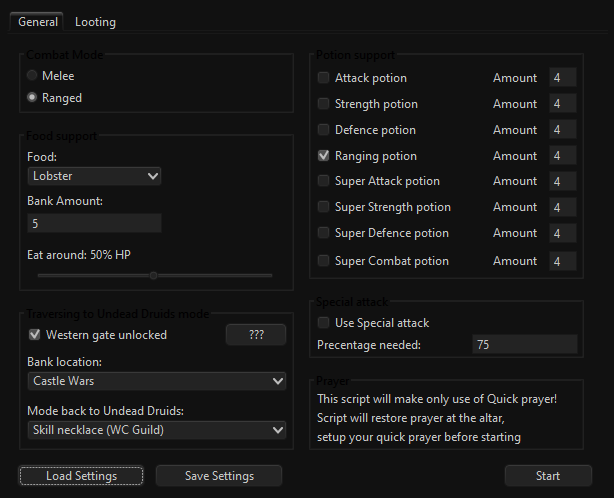
- Mirror or regular client? regular - Which settings did you use in the GUI? - see image problem: constantly fails to recharge prayer at the altar, dies around 5x an hour
-
Hey, I recently bought the mining script and am very pleased. Can you give me a trial for the undead druids script? seems interesting


