






Callum Stillwell
Members
-
Joined
-
Last visited
-
Currently doing oak dungeon doors, it seems that each time it has built the doors it sends the butler instead of sending the butler again before making the doors. This wasn't the case for oak larders but considering dungeon doors are meant to be faster, I am getting the same XP rates. Proof
-
Could I also get a trail for this?
-
I am using a proxy and still doesn't work.
-
Although prayer flick is in beta, doesn't currently work alongside a cannon, just lets cannon run out of balls but continues to flick prayer. Other than that it seems flawless. Good GUI with simple instructions. The script is very detailed and thorough in comparison to others. Great job!
-
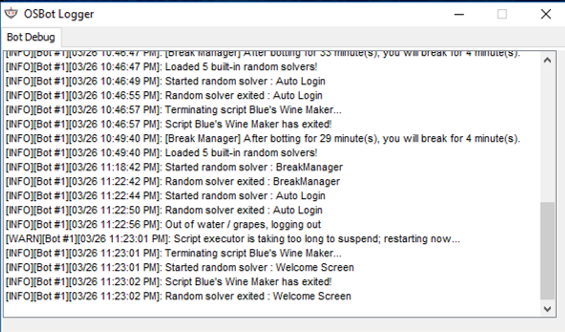
Just for proof, had roughly 30k of jugs and grapes in the bank.
-
Not sure didn't look but regularly happens. takes a break every 30/40 minutes and gets stuck on the page. Not a big issue as I'm usually there to fix it but for others, it might. Other than that, excellent!
-
Gets stuck sometimes after taking a break on the screen after logging in
-
Script Name: Khal warriors guild - Trial Length: 2 days - Reason for Trial: looking to sell account - Are you ging to give feedback on the script?: Yes


