Jump to content
View in the app

A better way to browse. Learn more.

OSBot :: 2007 OSRS Botting

A full-screen app on your home screen with push notifications, badges and more.

To install this app on iOS and iPadOS
  1. Tap the Share icon in Safari
  2. Scroll the menu and tap Add to Home Screen.
  3. Tap Add in the top-right corner.
To install this app on Android
  1. Tap the 3-dot menu (⋮) in the top-right corner of the browser.
  2. Tap Add to Home screen or Install app.
  3. Confirm by tapping Install.

Pryzm

Trade With Caution
  • Joined

  • Last visited

  1. He then messaged me again saying he had paid by PayPal? When he clearly hasn’t now he won’t respond to my message. For gods sake, kids running rampage during Easter break.
  2. Pryzm replied to Pryzm's topic in Price Check
    Thanks guys, I'll train it to 75. Probably got about 300 hours to go.
  3. Pryzm posted a topic in Price Check
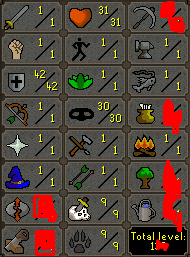
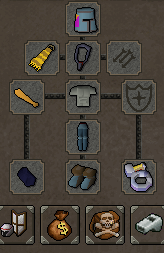
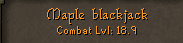
    Value of this account? Thanks.
  4. Pryzm replied to T H C's topic in Botting & Bans
    I haven’t got answers back on 3 accounts in about 3 weeks now.. is that normal? the accounts that successfully got quashed were approved within a few days.
  5. The software keeps thinking I’m moving my mouse, any idea why? ( I’m not ).
  6. Thanks for sharing what program you use, in the process of making some accounts my self.
  7. Gonna give this a quick try on a few worlds.
  8. Pryzm replied to montie's topic in Price Check
    Wrong Section broooooooo
  9. 1 in everything else?
  10. 60m then
  11. Pryzm replied to Destrupt's topic in Price Check
    100M

Account

Navigation

Search

Configure browser push notifications

Chrome (Android)
  1. Tap the lock icon next to the address bar.
  2. Tap Permissions → Notifications.
  3. Adjust your preference.
Chrome (Desktop)
  1. Click the padlock icon in the address bar.
  2. Select Site settings.
  3. Find Notifications and adjust your preference.