Jump to content
View in the app

A better way to browse. Learn more.

OSBot :: 2007 OSRS Botting

A full-screen app on your home screen with push notifications, badges and more.

To install this app on iOS and iPadOS
  1. Tap the Share icon in Safari
  2. Scroll the menu and tap Add to Home Screen.
  3. Tap Add in the top-right corner.
To install this app on Android
  1. Tap the 3-dot menu (⋮) in the top-right corner of the browser.
  2. Tap Add to Home screen or Install app.
  3. Confirm by tapping Install.

ike7

Members
  • Joined

  • Last visited

Everything posted by ike7

  1. ike7 replied to Night's topic in Money Making
    Another one, which is easily doable
  2. ike7 replied to Night's topic in Money Making
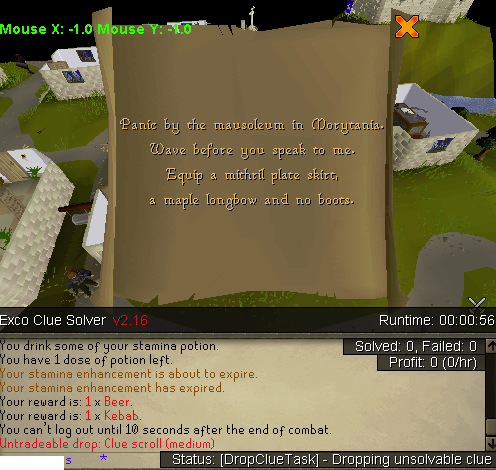
    It wants to drop this clue, even tho i have the requirements for it?
  3. ike7 replied to Night's topic in Money Making
    Could i have a trial?
  4. ike7 replied to ProjectPact's topic in Hunter
    Yo bro, whenever I start the script with progressive leveling it walks to the trainingspot teleports back to castlewars/barbarian outpost and walks to the training spot. Keeps on repeating this process. However it works when I dont use the progressive leveler is this because of me?
  5. trail pls
  6. ike7 replied to Fruity's topic in Minigames
    Yes i went from 60-99str with no bans yet
  7. ike7 replied to Fruity's topic in Minigames
    Any1 can tell me what bestest way to go 99 attack defence i already got 99str should i stay dharoking or tent whip?
  8. Trial please
  9. ike7 replied to Fruity's topic in Minigames
    When the script wants to go into a dream it clicks on practise and it wont do anything how to fix this, I tried selecting other dreams in the options like demon md etc
  10. I'm sorry didnt read thanks!
  11. It hops in F2P to 500 and 750 Total worlds which most accounts dont have. Please fix

Account

Navigation

Search

Configure browser push notifications

Chrome (Android)
  1. Tap the lock icon next to the address bar.
  2. Tap Permissions → Notifications.
  3. Adjust your preference.
Chrome (Desktop)
  1. Click the padlock icon in the address bar.
  2. Select Site settings.
  3. Find Notifications and adjust your preference.