






Coreh
Trade With Caution
-
Joined
-
Last visited
Everything posted by Coreh
-
Wondering how much I could sell this account for: Here's the rest of the account stats/info: https://gyazo.com/0e96b112f425d178bec5694ec6b4ef25 - 266 QP https://gyazo.com/033cbeab61dc745e3df389880696d5ea - Maxed POH https://gyazo.com/02989465756baec8ebd72ce7f4682afb - Full Favour https://gyazo.com/ceba0f9b05484a7d52a358301e2b6d88 - All medium diaries done, 80% hard diaries completed. The bank has been cleared.
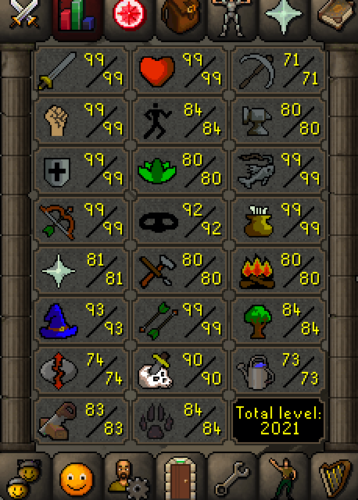
-
Am I the only one who thought this was about the song iSpy? no? k.
-
Saw this on World 382 at North East of GE, some guy has what I'm guessing is a lot of bots and they're doing everything he's saying, including playing a huge game of snake around the GE. He's still there if you want to check it out. https://gyazo.com/db9edefe27d6560e4a4e1158903fed7b
-
How do you expect to use an ambot without a jtag/rgh?Goodluck with service - made me a free dope private script, highly recommend.Add my Skype - sycmods. Would love to do thisWill beat the price given from anyone else, add my Skype: sycmods2m on account 1.Hunter = 38gp/xp Thieving = 32gp/xp Add my Skype: sycmodsYeh, I didn't realise the VPN on Chrome was turned on haha, silly mistake from me.Not sure, I have a VPN on my google chrome but not my actual computer, so when I made the accounts the IP was different to when I used the in-game.It was a fake email and yes it was botted, but many of other people do this without getting their accounts locked?Not looking for people to sell them to me, looking for why the got locked...Hey, I'm looking for some support to a problem I noticed last night. I spent a while making and completing tutorial island on 50 accounts with an unregistered email address. After I finished the last one, I went back on some of the accounts I created first and they were all locked!? Is there a reason for this and if so a way around it? I'd love some answers.Can do this quickly and can start now - add my Skype: sycmodsThey must have the following criteria in their thread: 1. Pictures of the account stats: https://gyazo.com/34b9c1608a207d26b6d8f20cffa276ae 2. Pictures of the login details https://gyazo.com/b8a51273927a7772762065ba9be0ca5e 3. Pictures of the total wealth (if there is any) N/A 4. Pictures of the quests completed https://gyazo.com/72a857af9d8ac35e089f8d9c5f86c76f 5. The price you will be starting bids at $15 6. The A/W (Auto-win) for your account $20 7. The methods of payment you are accepting Paypal ONLY. 8. Your trading conditions You go first unless I think trusted enough. 9. Pictures of the account status https://gyazo.com/220cfa75f93428109a707ced46666739 10. Original/previous owners AND Original Email Address Is a Username Login account, I purchased this from a gold selling store around a year or two ago and had no problems.Need my starter main account price checking asap please, has a username login. https://gyazo.com/96c915f1816ab21b641285ac0aba2732 https://gyazo.com/fcc4f08283e28bfe94e01d6df17b44b4



Account
Navigation
Search
Configure browser push notifications
Chrome (Android)
- Tap the lock icon next to the address bar.
- Tap Permissions → Notifications.
- Adjust your preference.
Chrome (Desktop)
- Click the padlock icon in the address bar.
- Select Site settings.
- Find Notifications and adjust your preference.
Safari (iOS 16.4+)
- Ensure the site is installed via Add to Home Screen.
- Open Settings App → Notifications.
- Find your app name and adjust your preference.
Safari (macOS)
- Go to Safari → Preferences.
- Click the Websites tab.
- Select Notifications in the sidebar.
- Find this website and adjust your preference.
Edge (Android)
- Tap the lock icon next to the address bar.
- Tap Permissions.
- Find Notifications and adjust your preference.
Edge (Desktop)
- Click the padlock icon in the address bar.
- Click Permissions for this site.
- Find Notifications and adjust your preference.
Firefox (Android)
- Go to Settings → Site permissions.
- Tap Notifications.
- Find this site in the list and adjust your preference.
Firefox (Desktop)
- Open Firefox Settings.
- Search for Notifications.
- Find this site in the list and adjust your preference.