




Jump to content
View in the app

A better way to browse. Learn more.

OSBot :: 2007 OSRS Botting

A full-screen app on your home screen with push notifications, badges and more.

To install this app on iOS and iPadOS
  1. Tap the Share icon in Safari
  2. Scroll the menu and tap Add to Home Screen.
  3. Tap Add in the top-right corner.
To install this app on Android
  1. Tap the 3-dot menu (⋮) in the top-right corner of the browser.
  2. Tap Add to Home screen or Install app.
  3. Confirm by tapping Install.

gearing

Members
  • Joined

  • Last visited

Everything posted by gearing

  1. sent request
  2. contact me via skype i got a zul/main
  3. @Furious 7 dont let the GIF fool you
  4. full void with mage helm/cape/accumulator, no active blackmarks
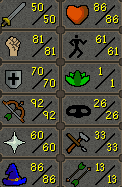
  5. 21m skype: gearing.osbot ps: or come to the chatbox
  6. gearing replied to channyice's topic in Botting & Bans
    that you have faulty logic
  7. added your discord
  8. get 40hp & 3-4m
  9. gearing replied to visuore's topic in Requests
    then get scammed p.s.: being a tight-ass never helped anyone in the black market
  10. trial and error, although i DO believe that you arent the first bloke with this idea, hence your calculations might be faulty & expectations unrealistic all you do is making a dime cause you are not paying taxes like legitimate resellers, personally, id suggest going with faster moving goods that cost less

Account

Navigation

Search

Configure browser push notifications

Chrome (Android)
  1. Tap the lock icon next to the address bar.
  2. Tap Permissions → Notifications.
  3. Adjust your preference.
Chrome (Desktop)
  1. Click the padlock icon in the address bar.
  2. Select Site settings.
  3. Find Notifications and adjust your preference.


