Jump to content
View in the app

A better way to browse. Learn more.

OSBot :: 2007 OSRS Botting

A full-screen app on your home screen with push notifications, badges and more.

To install this app on iOS and iPadOS
  1. Tap the Share icon in Safari
  2. Scroll the menu and tap Add to Home Screen.
  3. Tap Add in the top-right corner.
To install this app on Android
  1. Tap the 3-dot menu (⋮) in the top-right corner of the browser.
  2. Tap Add to Home screen or Install app.
  3. Confirm by tapping Install.

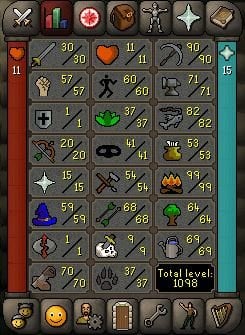
b3020981

Members
  • Joined

  • Last visited

  1. Hey, just wondering if this grinds bones at ectofunctus?
  2. * UPDATE, account does have an email registered. However, this would, in theory, be provided with the account.
  3. Mucho appreciated!
  4. + 1 to being safe providing you don't bot main on home IP
  5. b3020981 replied to Pew999's topic in Price Check
    w/ melee stats ~ 120-160m + mining ~ 40-50m May be difficult to find someone interested in both
  6. b3020981 replied to iz0n's topic in Price Check
    ~ 20m
  7. Hey, do you offer trials? Just seen sorry! Would it be possible to trial pl0x
  8. b3020981 replied to botelias's topic in Spam/Off Topic
    Woop - hopefully more have come 🤙
  9. HCIM usually go for 50-70 USD with those stats, so maybe looking at 30m-40m RSGP if regular iron?
  10. b3020981 replied to joniassassin's topic in Price Check
    ^ would be helpful man!
  11. Red Spider Egg looter would be cool 🙂
  12. Wondered if you're still looking? https://osbot.org/forum/topic/159714-pc-starter-ironman-90-mining-with-pet-99-firemaking-70-construction-82-fishing-misc-skilling-outfits/?do=getNewComment
  13. Hi, Looking for a PC in OSGP or USD All hand-trained, OO, and unregistered email. Looking to sell after dying as HCIM. Bank value on account is negligible. Thanks, B

Account

Navigation

Search

Configure browser push notifications

Chrome (Android)
  1. Tap the lock icon next to the address bar.
  2. Tap Permissions → Notifications.
  3. Adjust your preference.
Chrome (Desktop)
  1. Click the padlock icon in the address bar.
  2. Select Site settings.
  3. Find Notifications and adjust your preference.