
titanstorm
Members
-
Joined
-
Last visited
-
Thanks for the idea I might do that, I was originally going to make a range tank but I'm starting to burn out and thought I'd see what I'd get for it.
-
I didn't expect my bonds or time to be taken into account, but for that price ill just give it to a buddy to play. Thanks anyways for replying
-
really lol I spent 10m in bonds on it... not to mention my time
-
86 combat, 96 qp, d defender, monkey madness done
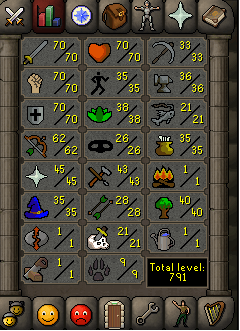
-
1. Pictures of the account stats 2. Pictures of the login details http://imgur.com/YrGwD88 3. Pictures of the total wealth (if there is any) http://imgur.com/3MlfTrx 4. Pictures of the quests completed http://imgur.com/ReVgmgR 5. The price you will be starting bids at 30m 6. The A/W (Auto-win) for your account 80m 7. The methods of payment you are accepting OS GP 8. Your trading conditions You go first or middleman 9. Pictures of the account status http://imgur.com/Hea7AYY 10. Original/previous owners AND Original Email Address I am the original owner and it includes the original e-mail
-
Title, i have 100 posts, just want to sell my account ffs.
-
nice man gl
-
report him to the cyber police lul
-
-
damn dude good luck with this
-
damn homie
-
yeah its too easy to get caught now, i dont even bother anymore
-
-
all mmo's die eventually
-
this is likely, also more of them coming into the game every day