







D Bolter
Java Lifetime Sponsor
-
Joined
-
Last visited
Everything posted by D Bolter
-
thanks, fixed them.He's never had any problems with the proxy as you can see on the screenshots below. I would post more screenshots but I'm using my phone and at work right now. All he said was that he died and i need to fix my proxy very rudely. How do I go off of that? It's his internet that dc'd him and he just wants to blame me. There's no proof he was even doing f cape or dc'd at all. He's literally never complained about disconnections. If he ever experienced a disconnection on the proxy, he wouldn't have renewed it. Logically, if he's ever dc'd on a proxy before, why would he do jad on it? Nothing adds up. Why even chargeback all payments? attempt to scam obviously. As you can tell from the screenshot below, this guy is clearly full of shit.
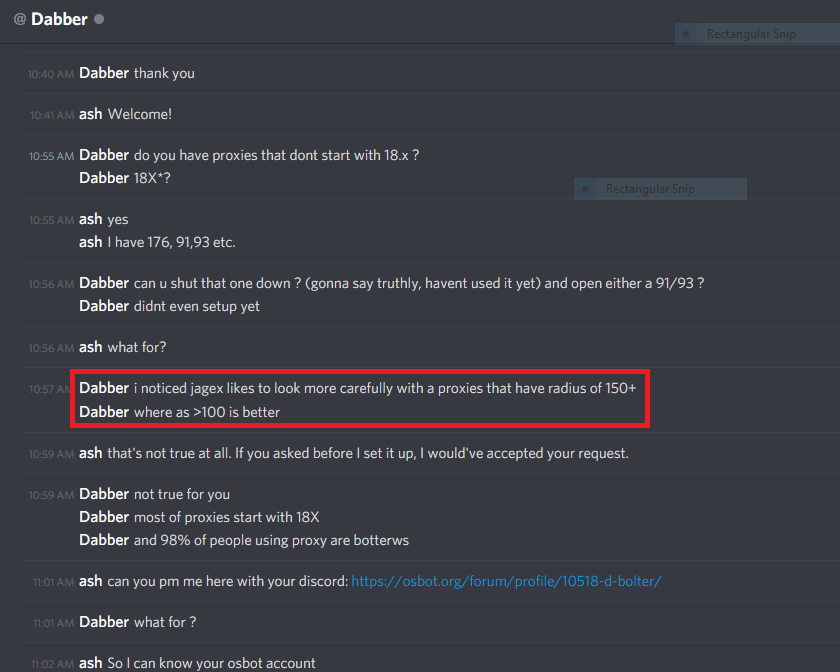 It's none of the original owner's business what the buyer does with the account so they need to pass along all the information imo.You can bump every 3 hours with sponsor pc*2;After the insurance runs out (if any) PA won't reimburse/refund you for recovered accounts.May I ask how trustworthy the seller is? Account recovery scams are extremely common these days. Just my 2 cents.hey man welcomeDisputed member: [member=eimxas999] Thread Link: Explanation: He charged back the 3 payments he made towards a proxy purchase. He purchased it on January 9, renewed it on Jan 24, and Feb 7. All payments are under dispute. Evidence: Hide please Jan 24 transaction: feb 7 transaction:

Account
Navigation
Search
Configure browser push notifications
Chrome (Android)
- Tap the lock icon next to the address bar.
- Tap Permissions → Notifications.
- Adjust your preference.
Chrome (Desktop)
- Click the padlock icon in the address bar.
- Select Site settings.
- Find Notifications and adjust your preference.
Safari (iOS 16.4+)
- Ensure the site is installed via Add to Home Screen.
- Open Settings App → Notifications.
- Find your app name and adjust your preference.
Safari (macOS)
- Go to Safari → Preferences.
- Click the Websites tab.
- Select Notifications in the sidebar.
- Find this website and adjust your preference.
Edge (Android)
- Tap the lock icon next to the address bar.
- Tap Permissions.
- Find Notifications and adjust your preference.
Edge (Desktop)
- Click the padlock icon in the address bar.
- Click Permissions for this site.
- Find Notifications and adjust your preference.
Firefox (Android)
- Go to Settings → Site permissions.
- Tap Notifications.
- Find this site in the list and adjust your preference.
Firefox (Desktop)
- Open Firefox Settings.
- Search for Notifications.
- Find this site in the list and adjust your preference.

