




Jump to content
View in the app

A better way to browse. Learn more.

OSBot :: 2007 OSRS Botting

A full-screen app on your home screen with push notifications, badges and more.

To install this app on iOS and iPadOS
  1. Tap the Share icon in Safari
  2. Scroll the menu and tap Add to Home Screen.
  3. Tap Add in the top-right corner.
To install this app on Android
  1. Tap the 3-dot menu (⋮) in the top-right corner of the browser.
  2. Tap Add to Home screen or Install app.
  3. Confirm by tapping Install.

piii95

Members
  • Joined

  • Last visited

  1. Can I have a trial please?
  2. piii95 replied to Czar's topic in Thieving
    Can I have a trial please?
  3. Possible to get a trial for this one? Thanks
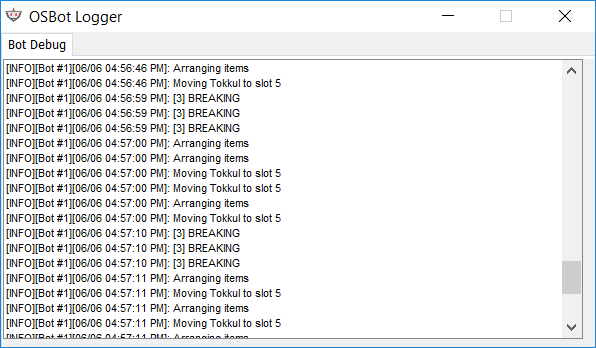
  4. It deleted all my tabs and didn't manage to put one thing in the right place. The bot drags the item up, but doesn't release it. When I manually put the item in the right place, it moved on to get stuck the same way on the next item. Same problem on both injection and mirror.
  5. This will make the script so much better imo. Having 9 less compost in your inventory makes trips a lot faster too.
  6. Love the script! Thought about adding Trollheim herb patch with Trollheim teleport? Would make the script even doper.
  7. piii95 replied to Fruity's topic in Minigames
    Rock cake method pretty broken atm..
  8. piii95 replied to Khaleesi's topic in Agility
    Can I get a trial?
  9. Possible to get a trial?

Account

Navigation

Search

Configure browser push notifications

Chrome (Android)
  1. Tap the lock icon next to the address bar.
  2. Tap Permissions → Notifications.
  3. Adjust your preference.
Chrome (Desktop)
  1. Click the padlock icon in the address bar.
  2. Select Site settings.
  3. Find Notifications and adjust your preference.
