





Leaderboard




Popular Content
Showing content with the highest reputation on 12/27/24 in Posts
-
1 pointthe script not working it gets hung up on taking our prayer pots. i've tried multiple different combinations and it still gets hung up. reference screenshot attached.
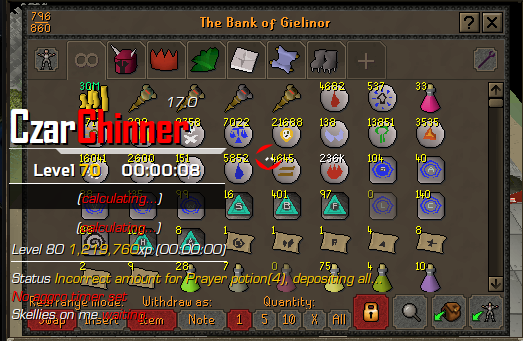 1 point
 -
1 point
-
1 point
-
1 pointAlready using Magic AIO, Fighter AIO, Fisher, Miner, PC and Smither but would love to test this one too. Possible to get trial? 😉1 point
-
Hey welcome first of all ;D does this show up on the actual osbot client? Or the website, or neither? Please confirm1 point
-
0 points
-
0 pointsgday i just bought this and its not working as intended i messaged you on discord since which i thought will be quicker to resolve0 points
-
0 pointsSorry for the delay, my notifications weren't arriving This is a scenario I never anticipated, doing these quests in member worlds. I believe it only works in free worlds.0 points
-
0 pointsOn point #83, it's going to the wilderness chaos temple and getting killed by elder chaos druids. What quest is this for, and is there an alternative?0 points
-
0 points0 points0 pointsHey Heiz. FInally bought the script! So ive started with x marks the spot... 1. bot banks? 2. bot goes to retrieve a dagger? 3, sells dagger? 4. buys spade? 5. then digs outside lumbridge castle. not to mention it hasnt even started the quest. So im not sure whats going on here !0 points


