




Jump to content
View in the app

A better way to browse. Learn more.

OSBot :: 2007 OSRS Botting

A full-screen app on your home screen with push notifications, badges and more.

To install this app on iOS and iPadOS
  1. Tap the Share icon in Safari
  2. Scroll the menu and tap Add to Home Screen.
  3. Tap Add in the top-right corner.
To install this app on Android
  1. Tap the 3-dot menu (⋮) in the top-right corner of the browser.
  2. Tap Add to Home screen or Install app.
  3. Confirm by tapping Install.

Post up your rides.

Featured Replies

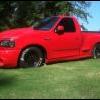
Like the title says post a picture of your car/truck etc... I'll start it off. Sorry for big picture buts a 2000 model Ford Lightning it's about a 400 hp with over 500 ft lbs of torque i also have an 1986 F100 4x4 with a 302 4 barrel holly 750 carb and a 1971 f100 with a 302 but im building a 351 windsor stroker to go into it 4kB0a.JPG

  • Author

Yes 1 time with it had a few mods it ran a 12.8 which isnt to shabby for a 4500 pound truck on street tires since then i got some D/R but havent went back to the track due to it being so hot. Lightnings are amazing trucks, But I'm also a die hard for fan biggrin.png. I love peoples faces at stop lights when this truck will out run corvettes from red light to red light.

Edited by Imduality

  • Author

it runs 91 octane and it gets 12-15 when i dont put my lead foot into eat. But i love to hear that supercharger WHIIINE. :p but im a big guy (6'6 250 lbs) a car is out of the question so its kinda like my own little sports care biggrin.png. I've raced a friends T/A has an LS1 in it, I ran off and left him off the line and top end.

  • Author

Nice truck, I love those incubus rims. I almost bought a set for my 86 but backed out and went with AR Bajas instead. happy.png

Recently Browsing 0

  • No registered users viewing this page.

Account

Navigation

Search

Configure browser push notifications

Chrome (Android)
  1. Tap the lock icon next to the address bar.
  2. Tap Permissions → Notifications.
  3. Adjust your preference.
Chrome (Desktop)
  1. Click the padlock icon in the address bar.
  2. Select Site settings.
  3. Find Notifications and adjust your preference.