
Jump to content
View in the app

A better way to browse. Learn more.

OSBot :: 2007 OSRS Botting

A full-screen app on your home screen with push notifications, badges and more.

To install this app on iOS and iPadOS
  1. Tap the Share icon in Safari
  2. Scroll the menu and tap Add to Home Screen.
  3. Tap Add in the top-right corner.
To install this app on Android
  1. Tap the 3-dot menu (⋮) in the top-right corner of the browser.
  2. Tap Add to Home screen or Install app.
  3. Confirm by tapping Install.

Dfewsloc

Trade With Caution
  • Joined

  • Last visited

Everything posted by Dfewsloc

  1. Bump someone take this off me so i stop STAKING LOL
  2. bad proxys maybe
  3. THNX MAN !
  4. https://gyazo.com/cf62b2b6f20adb68b0a1ef00a5997d2a Thank u
  5. 71 magic 50 def price?
  6. Dfewsloc replied to Koont's topic in Requests
    Can do for 28M
  7. Dfewsloc replied to OSRSKyle's topic in Requests
    how much are you paying?
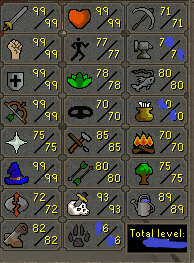
  8. i have a pure 50 attack 95 str 94 Hp 99 range 89 magic 43 prayer mith gloves , 100 zulrah kc
  9. its m1tch!!!
  10. Dfewsloc replied to aeondenied's topic in Archive
    Scripts mainly since you can still get banned using mirror mode.
  11. Goodluck goodnight!
  12. Nice good luck with this !

Account

Navigation

Search

Configure browser push notifications

Chrome (Android)
  1. Tap the lock icon next to the address bar.
  2. Tap Permissions → Notifications.
  3. Adjust your preference.
Chrome (Desktop)
  1. Click the padlock icon in the address bar.
  2. Select Site settings.
  3. Find Notifications and adjust your preference.