

Maxlaxen
Members
-
Joined
-
Last visited
Everything posted by Maxlaxen
-
Bump
-
Extremely useful and nice free script! The only thing I'm missing for this is that the bot doesn't keep attacking when leveling up, which makes the acc log out if it accidentally safespots something Is this something you could implement? Would be the best update ever ^^ Thank you!
-
Bump
-
Account 1 What do you need? : 46-51 Agility, Plague City, Biohazard, Underground Pass, Regicide Payment method? : OSRS GP Going first or middleman? : Going first if trusted, otherwise VMM Discord ID? : Maxlaxen#8504 Account 2 40-51 Agility, Plague City, Biohazard, Underground Pass, Regicide Payment method: OSRS GP Going first or middleman? : Going first if trusted, otherwise VMM Discord ID? : Maxlaxen#8504 Thanks
-
Bump
-
40m bid received.
-
Bump
-
Bump
-
Bump
-
Ehm I guess, what's the purpose though?
-
bump
-
1. Pictures of the account stats https://imgur.com/a/AOPdqVB 2. Pictures of the login details https://imgur.com/a/zW2j6Cg 3. Pictures of the total wealth (if there is any) https://imgur.com/a/aj4UKhS 4. Pictures of the quests completed https://imgur.com/a/btOKP5z 5. The price you will be starting bids at 40m 35m 6. The A/W (Auto-win) for your account 60m 50m 7. The methods of payment you are accepting OSRS GP 8. Your trading conditions VMM/You first/Me first if you're highly reputable. 9. Pictures of the account status https://imgur.com/a/CK4QW3R 10. Original/previous owners AND Original Email Address I am the Original Owner and will provide the Original Email Adress aswell. **In case you have missed it, the account had a 2 day ban** Thank you!
-
Perfect, as I thought then thank you
-
100m or more.
-
60 Attack 60 Strength 70 Defence 81 HP 52 Prayer 81 Ranged 83 Magic 40 Agility Ava's/Mage cape/Priest in Peril Account had a 2 day ban.
-
Since the prices stopped to show up I get a problem with this aswell: EDIT: Weird, started working again after restarting the client. Never happened before though
-
It doesnt have 52 agility since its only made for barrows. All accs have 20+ in their skills for a bit more legit look.
-
Acc 1 doesnt have regicide or anything zulrah-like. Its a barrows ready account (priest in peril). Gotta start somewhere right..?
-
Hi! Acc 1 Im the original owner, no registered mail, no bans. 60 attack/str, 70 def, 70+ hp, 75 ranged, 81 mage, 50+ pray. Avas and Mage cape, Acc 2 Im the original owner, no registered mail, no bans. 70 def, 85 ranged, 87 magic, 80+ hp, 56 prayer, book of darkness, mage cape, barcrawl miniq, Avas, regicide complete Thank you
-
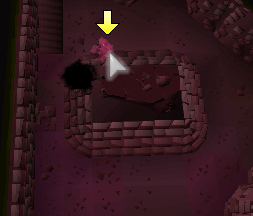
Bot gets stuck like this very often. just keeps on hovering the brother... Eventually the bot goes upstairs but it usually makes the trips more time consuming
-
I think he meant that he's currently using v1 and would like to try v2. Are you using mirror mode? Might be the cause.
-
Holy shit thats a major issue my friend :'D
-
Are there any known "major" issues with v2? Thinking about buying again but kind of scared since Weath looked into it..
-
Yes you get good exp. I'd say it is better than the sand crab script. Havent tried it personally but I know there are basically no worries with FruityNMZ Gl
-
Please, please, please add ranging potion support @FrostBug <3<3