






sdrfx999
Members
-
Joined
-
Last visited
-
ahh just alt+tabbed to check and i got banned rip lol
-
was running for 7+ hrs before rs updated... anyways got up to level 56 still doing shrimp lol
-
can do it for 5m or less
-
50/80/75/44/95 dt done but haven done the quest for mith gloves just rushed dt lol
-
I have one with like 30 champs or more
-
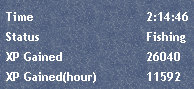
Made new account for fishing only and currently using this, will come back and update. E: currently 30 fishing since its f2p im just doing shrimp behind lumbridge, banking was eh so I went with dropping (on my hcim FeelsBad) E2: 40 fishing added xp ss doesnt show full hr/xp since i stopped it twice or so
-
1 - 99atk/str, 96 hp, 75 def, 80 range, 70 prayer, 76 magic, 70 construction 2- 87 atk 85 def 92 str 90 hp 75 range 70 range 83 magic 73 slayer 77 fish 70 smith 74 mining 3 - 99atk/str/hp/range 90 prayer 95 magic 70gility/herb E: 4- 50atk/80str/1def/75range/44prayer/95 magic with dt done In usd/gp, thanks.
-
Its good but drops everything so fast and made like 4 accounts all got banned before hitting level 60 lol

