Jump to content
View in the app

A better way to browse. Learn more.

OSBot :: 2007 OSRS Botting

A full-screen app on your home screen with push notifications, badges and more.

To install this app on iOS and iPadOS
  1. Tap the Share icon in Safari
  2. Scroll the menu and tap Add to Home Screen.
  3. Tap Add in the top-right corner.
To install this app on Android
  1. Tap the 3-dot menu (⋮) in the top-right corner of the browser.
  2. Tap Add to Home screen or Install app.
  3. Confirm by tapping Install.

Pinoy

Members
  • Joined

  • Last visited

Everything posted by Pinoy

  1. Pinoy replied to Czar's topic in Magic & Prayer
    Can I have a trial for this?
  2. Pinoy replied to Khaleesi's topic in Agility
    I would like a trial, please.
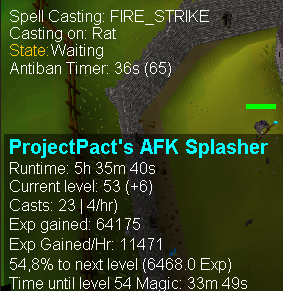
  3. It logged out once in this run. No idea how it happened, I just logged it back in and it went smooth again. Overall nice script, as promised a nice proggy:
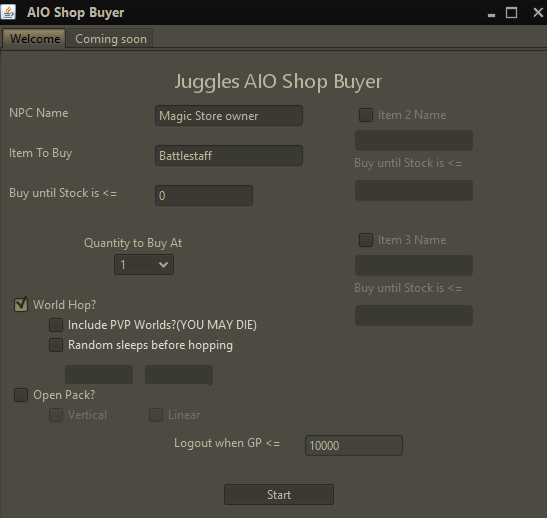
  4. This is what I filled in. I tried to run it again. For some reason the bot thinks that the shop is on floor 0, while the shop is in floor +1.
  5. Not sure if I'm doint it wrong, but I can't make it work at the Wizard guild in Yanille. This is what happens: 1. I start the bot at the shop in floor +1. 2. The bot left-clicks on the stairs to go to floor 0. 3. The bot right-clicks on the stairs again and chooses 'walk here'. 4. One gigantic lag and client starts to eat memory space like crazy. Tried it over a few times, with same result. Any idea's what is going wrong?
  6. May I get a trial? Would like to test it out and if it's good I will buy it.

Account

Navigation

Search

Configure browser push notifications

Chrome (Android)
  1. Tap the lock icon next to the address bar.
  2. Tap Permissions → Notifications.
  3. Adjust your preference.
Chrome (Desktop)
  1. Click the padlock icon in the address bar.
  2. Select Site settings.
  3. Find Notifications and adjust your preference.