
one_punch
Members
-
Joined
-
Last visited
Everything posted by one_punch
-
I have made the seller name public.
-
Why that?
-
I only bot on my pure that is my only account. I have used my login info in the osbot setup for automatic login and breaks. Was it because of that? I have still not got a reply back from the guy. Do you know a admin that i can contact with?
-
I don't know man. I am really sad i don't know what to do now. I have used my login info in the osbot setup for automatic login and breaks. Was it because of that?
-
No it is a local script from a well known seller. Yes i have used my login info for automatic login and breaks but i have used this in the osbot setup. If i have been hacked from this, That means osbot might not be trusted?
-
No it is not a sdn script. Just a local from a well known seller.
-
How? do you think because of osbot or the scripts?
-
It is from a well known scripter with high positive feedbacks. No it can't. I know this might sounds stupid but i know what i am doing. are you trolling me? why?
-
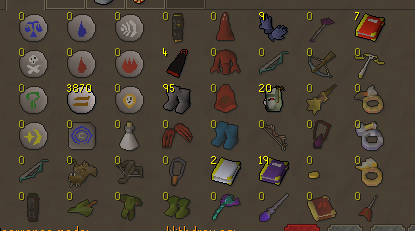
Yesterday i got hacked for my bank 190m for using a certain script. (I will not say the name until i get a reply from the seller). if i don't get a answerr back i will make the name of the seller public. I have been using this script for more than a year and never had problems unitl yesterday. My bank is cleaned. I am really sad atm I have put so many hours on my account. And no i don't clicked on any fake links or visited fishy sites. Has someone here hacked in the past using osbot? How i have been hacked? I want to speak to a Admin. please contact me. This was my bank:
-
@Czar Could I get a trial on Perfect Stronghold? Thanks in advance.
-
@Czar Could I get a trial please? Thanks in advance.
-
@Khaleesi Could I get a trial please?
-
- Script name - Khal AIO Caged Ogres - trial length - 24 hours - Reason for trial - Looking to purchase the script - Are you ging to give feedback on the script? Yes, of course I will give feed back
-
Can i have a trial please. Thanks!
-
If you get caugth you will get a perm bann, even if you not botted before. My advice is to you if you wanna bot, don't bot 24/7 or 8/9 hours a day. bot couple of hours and take breaks like 30min.
-
Czar perfect motherload mine. I don't know why my script is lagging.
-
Bro i have question, i have this script now for 4-5 months runs smootly, no complains. I just came back after a long break and i have been botting now for 3-4 days. I have realized i don't have the option Anti Idle. Is my script/client outdated, should i reinstall my script?
-
I have serious lagg issues the last couple 4-5 days. After i start the client the lagg begins and when i start my script i am getting more lagg and sometimes my screen gets frozen. I have no problem on the official rs07 client and my internet is also fine no lagg etc. Can someone help me please or give some advice, because i don't know what to do. I thank you guys in advance.
-
Can i have a trial please?
-
can i have a trial please.
-
Yo bro, after todays update the rock crab script doesn't work, he doesn't responds at all. Can u check please.
-
Hello, I bougth ur perfect fisher script yesterday and i had some problems with the bot. Most times the bot runs fine for hours and sometimes the bot stops after a hour or two at random moments. Can u please help me.
-
ai, thanks man! Let me know please.
-
Hello, Had u the time to look on the scipt? I have already tried couple of times but still the same problem. Let me know please.
-
Thanks man!