
Jump to content
View in the app

A better way to browse. Learn more.

OSBot :: 2007 OSRS Botting

A full-screen app on your home screen with push notifications, badges and more.

To install this app on iOS and iPadOS
  1. Tap the Share icon in Safari
  2. Scroll the menu and tap Add to Home Screen.
  3. Tap Add in the top-right corner.
To install this app on Android
  1. Tap the 3-dot menu (⋮) in the top-right corner of the browser.
  2. Tap Add to Home screen or Install app.
  3. Confirm by tapping Install.

JMo

Members
  • Joined

  • Last visited

  1. Make you are not running running RuneScape as admin. Right click on RS, properties, compatibility tab. Make sure the run as administrator is unchecked
  2. Is it creating an err_pid file on your desktop ?
  3. I have one full guardians of the rift as well
  4. JMo posted a topic in Price Check
    How much for Full graceful Full guardians of the rift 85 runecrafting 74 agility low level random other stats
  5. Can I get a trial boss man?
  6. JMo replied to Czar's topic in Money Making
    Can I have a trial!
  7. JMo replied to JMo's topic in Price Check
    Should I make it zulrah ready maybe you think that is a good value increaser?
  8. JMo posted a topic in Price Check
    Can I get an estimate on the worth of this account as is? Any recommendations on something can increase worth.
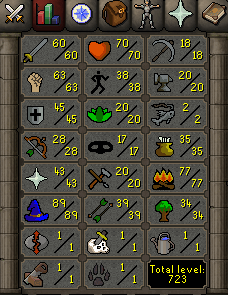
  9. JMo posted a topic in Price Check
    Nmz ready as well one 2 day on it from months ago
  10. I have one with a soul wars pet. If you are interested. It has decent combat stats as well has a one time 3 day ban on it tho.
  11. JMo replied to JMo's topic in Price Check
    Pics are correct. Is something not showing properly?
  12. Monkey Madness 1 Done
  13. JMo replied to Camaro's topic in Minigames
    I would like a trial
  14. Anybody have any ideas how to get mirror mode to rune one runelite. When I launch osbot with runelite running runelite crashes. If I launch osbot first runelite wont open. Any ideas? I know runelite and mirror mode is still iffy.
  15. JMo replied to JMo's topic in Goals
    posted

Account

Navigation

Search

Configure browser push notifications

Chrome (Android)
  1. Tap the lock icon next to the address bar.
  2. Tap Permissions → Notifications.
  3. Adjust your preference.
Chrome (Desktop)
  1. Click the padlock icon in the address bar.
  2. Select Site settings.
  3. Find Notifications and adjust your preference.