Jump to content
View in the app

A better way to browse. Learn more.

OSBot :: 2007 OSRS Botting

A full-screen app on your home screen with push notifications, badges and more.

To install this app on iOS and iPadOS
  1. Tap the Share icon in Safari
  2. Scroll the menu and tap Add to Home Screen.
  3. Tap Add in the top-right corner.
To install this app on Android
  1. Tap the 3-dot menu (⋮) in the top-right corner of the browser.
  2. Tap Add to Home screen or Install app.
  3. Confirm by tapping Install.

Chris01

Java Lifetime Sponsor
  • Joined

  • Last visited

Everything posted by Chris01

  1. @Night I don't remember the OO It was over a year and a half ago.
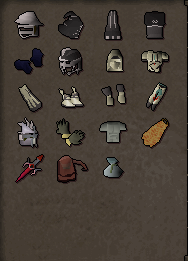
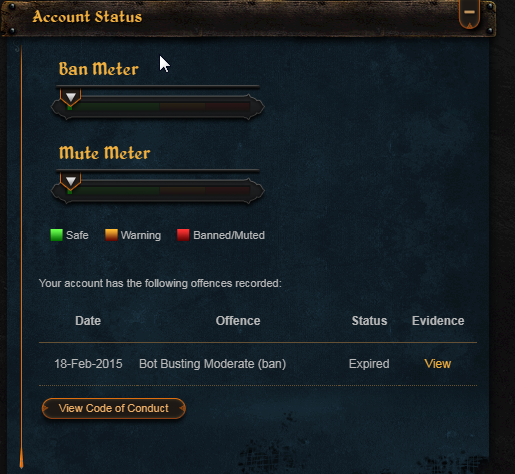
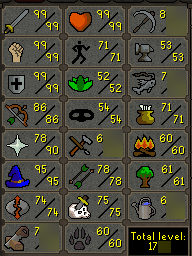
  2. 1. Pictures of the account stats 3. Pictures of the total wealth (if there is any) 4. Pictures of the quests completed 5. The price you will be starting bids at: 190m 6. The A/W (Auto-win) for your account No auto/win, will sell when the offer is right 7. The methods of payment you are accepting 07 GP/BTC/PP from only trusted people 8. Your trading conditions You go first, an you cover the fees 9. Pictures of the account status 10. Original/previous owners AND Original Email Address I am not OO, but have had control of the account for a year and a half. Original email will be given on trade for it is the login name. Email will be switched on trade.
  3. @loochinator yes
  4. @TheWind Hit me with ur price =)
  5. Accounts must have 80+ woodcutting with no bans an be rested for at least a week.
  6. Chris01 replied to RDM's topic in Spam/Off Topic
    u still banned from chat muffins? @Muffins
  7. gotta have 100 posts first before u can sell accounts
  8. 40 Defence Rune Pure / Starter Main ( Desert Treasure ) 15m
  9. well for 1. you're super new, 2. I've got a rank an you don't. 3. Im super fast at services that i pick to do. Not a joke, just gave you my price based off your forums account, if you don't like it don't go with me lol!
  10. 13m if you're able to get to canifis, if not 17m. 12hr time frame, my offer will only last for around 6hrs before i have to say no
  11. Alek isn't gonna be happy about this one

Account

Navigation

Search

Configure browser push notifications

Chrome (Android)
  1. Tap the lock icon next to the address bar.
  2. Tap Permissions → Notifications.
  3. Adjust your preference.
Chrome (Desktop)
  1. Click the padlock icon in the address bar.
  2. Select Site settings.
  3. Find Notifications and adjust your preference.