Jump to content
View in the app

A better way to browse. Learn more.

OSBot :: 2007 OSRS Botting

A full-screen app on your home screen with push notifications, badges and more.

To install this app on iOS and iPadOS
  1. Tap the Share icon in Safari
  2. Scroll the menu and tap Add to Home Screen.
  3. Tap Add in the top-right corner.
To install this app on Android
  1. Tap the 3-dot menu (⋮) in the top-right corner of the browser.
  2. Tap Add to Home screen or Install app.
  3. Confirm by tapping Install.

Durialxxx

Members
  • Joined

  • Last visited

  1. Durialxxx replied to Deceiver's topic in Spam/Off Topic
    Have you tried turning your computer off and on again?
  2. I will be able to tomorrow
  3. What the hell did I just read
  4. Yeah it's stupid insane exp. I think it was like 300k+ an hour?
  5. Scotty for president
  6. Okay thanks:)
  7. O.O Neeeaaattttt
  8. You don't think they'll perm ban me when I log on in two days do you?
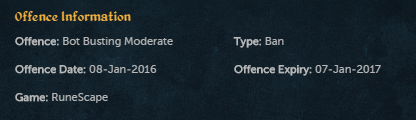
  9. Apparently I "botted" AKA logged in tomorrow and my offense expires today in a year wtf Jagex xD This is some Terminator Judgement day shit
  10. I see. It just sucks because that account had never been botted before, had 0 marks. *sigh*
  11. Just got a fresh account, never been played on with my IP. As soon as I logged in it logged me out and I got a ban for 2 days..if I log in again it isn't going to perm ban me is it?
  12. Am I laughing harder than I should?
  13. Durialxxx replied to atrain009's topic in Introductions
    Hope you get everything you've ever wanted here :3

Account

Navigation

Search

Configure browser push notifications

Chrome (Android)
  1. Tap the lock icon next to the address bar.
  2. Tap Permissions → Notifications.
  3. Adjust your preference.
Chrome (Desktop)
  1. Click the padlock icon in the address bar.
  2. Select Site settings.
  3. Find Notifications and adjust your preference.