






tranzystor3
Trade With Caution
-
Joined
-
Last visited
Everything posted by tranzystor3
-
my dick is big too
-
How faster does rune axe chops yew logs in comparison to bronze axe? Anyone tested it out?
-
how many per hour tho?!
-
whats reqs for that?
-
^ how many clay do you get per hour and whats the best spot ?
-
need accs. skype me!
-
Need to buy accs. Skyped u
-
Responded now.
-
prices lowered to 20m ea !
-
offers instead of shitposts please.
-
@Aaron please contact me via skype:maz_woj
-
guess thats his parents problems.
-
the only question that comes to mind is: what the hell is "wallah" ?
-
-
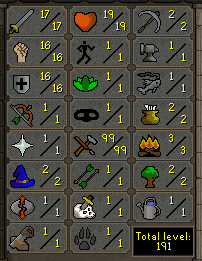
Yo, I have several 99 lvl crafting accs for sale (screenshots are the same because the skills on each acc are almost the same) post here or skype:maz_woj 1) PRICE: 20m Original owner: @ukasz 2) PRICE: 20m Original owner: @ukasz 3) PRICE: 20m Original owner: @ukasz NO MEMBERSHIP LEFT ON ANY OF THE ACCOUNTS
-
Hey, sorry for late reply. Wasn't checking forums too often. So I think i may be to blame for mistaking the original owner of the acc. At the time I was buying tut accs from Villius and also @Void (previously known as Montana of 300 - who is suspended now). In conclusion: I am for sure not the OO of this acc.
-
need accs skype me: maz_woj
-
i got 24m to sell you. mssg me on skype.
-
selling 24m 0.95/m Skrill only pme me or post here skype: maz_woj
-
bump, selling 12m 0.95/m Skrill only skype: maz_woj
-
so u're back or fucking with us
-
bump, selling 14m 0.95/m Skrill only skype: maz_woj
-
bump
-
bump
-
bump

