artman41
Members
-
Joined
-
Last visited
-
this bug occurs on the default client too, I've created a new thread so this can be closed
-
Version: OSBOT 2.5.22 Mirroring: Runelite Desc: When I run a crafting script (Explv AIO, Khal AIO Crafter), it'll crash within 20 seconds or so with the following error (same error for both other than namespace? Explv AIO: [ERROR][Bot #1][09/20 07:15:43 PM]: Error in bot executor! java.lang.AbstractMethodError: client.emu.EmuClient.getSpellSelected()Z at org.osbot.rs07.api.Magic.isSpellSelected(uh:229) at org.osbot.rs07.api.Menu.iiIIIiiIIIII(oo:157) at org.osbot.rs07.api.Menu.getMenuIndex(oo:256) at org.osbot.rs07.api.Menu.getMenuIndex(oo:81) at org.osbot.rs07.event.InteractionEvent$1.condition(gp:13) at org.osbot.rs07.utility.ConditionalSleep.sleep(wj:278) at org.osbot.rs07.event.InteractionEvent.iiIIIiiIIIII(gp:245) at org.osbot.rs07.event.InteractionEvent.execute(gp:430) at org.osbot.rs07.event.EventExecutor$2.run(uo:117) at org.osbot.rs07.event.EventExecutor.execute(uo:204) at org.osbot.rs07.script.MethodProvider.execute(ag:428) at org.osbot.rs07.api.Bank.iiIIIiiIIIII(rn:967) at org.osbot.rs07.api.Bank.withdraw(rn:1238) at org.osbot.rs07.api.Bank.withdraw(rn:1232) at org.osbot.rs07.api.Bank.withdraw(rn:1044) at org.aio.c.d.AUX.D(un:496) at org.aio.c.d.AUX.d(un:83) at org.aio.c.d.nul.execute(un:117) at org.osbot.rs07.event.EventExecutor$2.run(uo:117) at org.osbot.rs07.event.EventExecutor.execute(uo:204) at org.osbot.rs07.script.MethodProvider.execute(ag:428) at org.aio.c.d.AUX.d(un:132) at org.aio.c.d.AUX.J(un:110) at org.aio.c.d.AUX.k(un:66) at org.aio.c.a.b.CON.J(xm:161) at org.aio.c.c.Nul.k(sc:2) at org.aio.d.a.Nul.k(mb:161) at org.aio.d.d.Nul.k(jb:216) at org.aio.script.AIO.J(tb:195) at org.aio.script.AIO.onLoop(tb:60) at org.osbot.rs07.event.ScriptExecutor$InternalExecutor.run(we:242) at java.lang.Thread.run(Unknown Source) Khal AIO Crafter: [ERROR][Bot #1][09/20 07:13:55 PM]: Error in bot executor! java.lang.AbstractMethodError: client.emu.EmuClient.getSpellSelected()Z at org.osbot.rs07.api.Magic.isSpellSelected(uh:229) at org.osbot.rs07.api.Menu.iiIIIiiIIIII(oo:157) at org.osbot.rs07.api.Menu.getMenuIndex(oo:166) at org.osbot.rs07.event.InteractionEvent$1.condition(gp:13) at org.osbot.rs07.utility.ConditionalSleep.sleep(wj:278) at org.osbot.rs07.event.InteractionEvent.iiIIIiiIIIII(gp:245) at org.osbot.rs07.event.InteractionEvent.execute(gp:400) at org.osbot.rs07.event.EventExecutor$2.run(uo:117) at org.osbot.rs07.event.EventExecutor.execute(uo:204) at org.osbot.rs07.api.model.InteractableObject.interact(ze:183) at org.khal.khalcrafter.b.CON.C(g:217) at org.khal.khalcrafter.b.CON.j(g:569) at org.khal.khalcrafter.b.CON.C(g:912) at org.khal.khalcrafter.f.NUL.I(e:163) at org.khal.khalcrafter.f.NUL.C(e:28) at org.khal.khalcrafter.KhalAIOCrafter.onLoop(hb:121) at org.osbot.rs07.event.ScriptExecutor$InternalExecutor.run(we:242) at java.lang.Thread.run(Unknown Source)
-
-
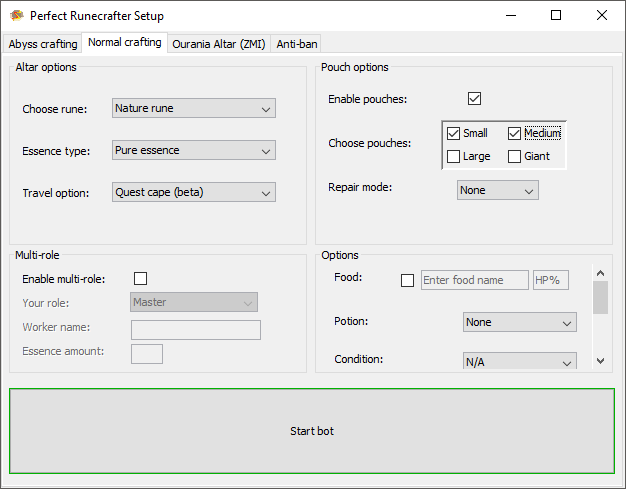
I've found that if you enable bags, the bot doesn't go to the bank to get the bags if your inv is full of essence, it just gets stuck clicking on the altar I'm also pretty sure that if you enable preparation when doing cosmics, the bot gets locked in the bank; clicks away, then back on the bank, repeat
-
Was looking in the logger when I saw this, not sure if it's an issue or not since you're handling the exception, but I thought it couldn't hurt to tell you about it
-
could I have a trial for Khal Blast Furnace please?
-
Any chance I could get a trial? thanks
-
Could I have a trial for perfect miner please?
-