






MinerSpark
Members
-
Joined
-
Last visited
Everything posted by MinerSpark
-
Not gonna list prices now?
-
-
I stream and do alot of multitasking, I create avatars/worlds for vrchat and watch vidoes while i do that
-
-
-
-
-
-
-
that second picture looks around 120m-200m Real rough guess
-
rank #1 gotten
-
I'll do a giveaway at 10 followers on here, 1 discord nitro or something, if i'm allowed ofc
-
110m top from me.
-
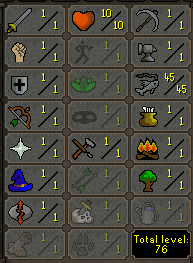
Lowest+Highest offers check, as trying to work out optimal range for levels
-
45-65m i'd pay
-
You're a terrorist! ;w;
-
Yes it is, i got a friend who got his 50m fishing angler alt banned because he never spoke ever, just fished everyday 24/7. he submitted a ban appeal a few days ago and it got declined total bs it really isYikesLook at these wonderful community MessagesNevered liked em nor need em, just money for companys, my mouse works literly anywhere tooShhh, its the bluntest thing ever xDI wanted to get an L desk for a good 2 weeks but then i saw this desk and bought it same day, couldnt resist! xD



Account
Navigation
Search
Configure browser push notifications
Chrome (Android)
- Tap the lock icon next to the address bar.
- Tap Permissions → Notifications.
- Adjust your preference.
Chrome (Desktop)
- Click the padlock icon in the address bar.
- Select Site settings.
- Find Notifications and adjust your preference.
Safari (iOS 16.4+)
- Ensure the site is installed via Add to Home Screen.
- Open Settings App → Notifications.
- Find your app name and adjust your preference.
Safari (macOS)
- Go to Safari → Preferences.
- Click the Websites tab.
- Select Notifications in the sidebar.
- Find this website and adjust your preference.
Edge (Android)
- Tap the lock icon next to the address bar.
- Tap Permissions.
- Find Notifications and adjust your preference.
Edge (Desktop)
- Click the padlock icon in the address bar.
- Click Permissions for this site.
- Find Notifications and adjust your preference.
Firefox (Android)
- Go to Settings → Site permissions.
- Tap Notifications.
- Find this site in the list and adjust your preference.
Firefox (Desktop)
- Open Firefox Settings.
- Search for Notifications.
- Find this site in the list and adjust your preference.