Jump to content
View in the app

A better way to browse. Learn more.

OSBot :: 2007 OSRS Botting

A full-screen app on your home screen with push notifications, badges and more.

To install this app on iOS and iPadOS
  1. Tap the Share icon in Safari
  2. Scroll the menu and tap Add to Home Screen.
  3. Tap Add in the top-right corner.
To install this app on Android
  1. Tap the 3-dot menu (⋮) in the top-right corner of the browser.
  2. Tap Add to Home screen or Install app.
  3. Confirm by tapping Install.

A1B2CC2B1A

Members
  • Joined

  • Last visited

  1. Hey Czar, I have 3 of your other scripts, any way i could get this one free?
  2. I'm trying to do alch and curse on the grizzly bear. It either spam clicks the curse spell or it switches between inventory and the spells menu. can you please look into this? thanks Edit: Restarted osbot. Works perfectly! Nice script!
  3. Great script! Only thing I would suggest would be a stop at level.
  4. Took me a bit, but it runs flawlessly!!
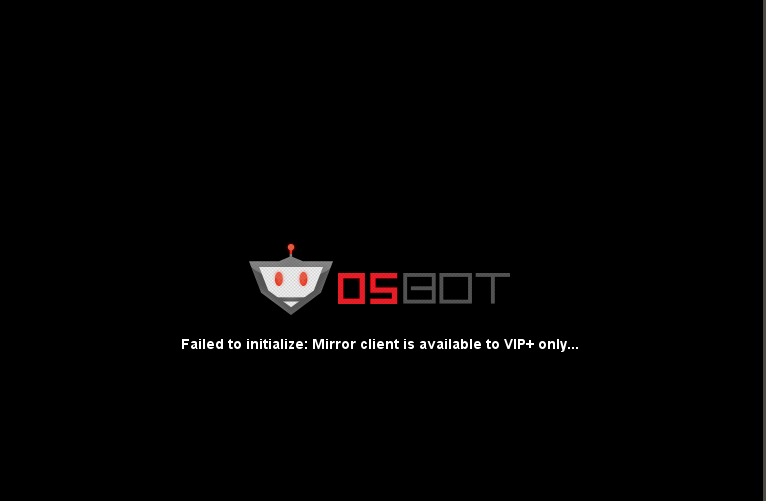
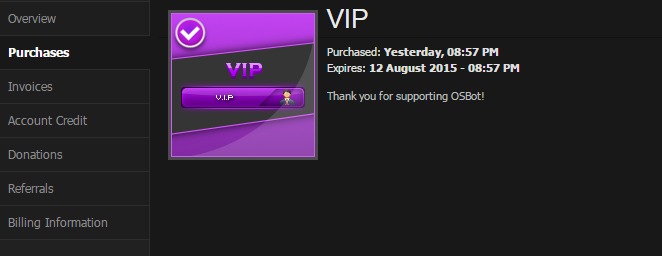
  5. I can't run mirror mode. It is saying I am not VIP, but I have attached my proof of purchase and the error I'm getting. Does anybody have a fix Client Error: ? Proof of Purchase:

Account

Navigation

Search

Configure browser push notifications

Chrome (Android)
  1. Tap the lock icon next to the address bar.
  2. Tap Permissions → Notifications.
  3. Adjust your preference.
Chrome (Desktop)
  1. Click the padlock icon in the address bar.
  2. Select Site settings.
  3. Find Notifications and adjust your preference.