






Tj2907
Trade With Caution
-
Joined
-
Last visited
-
 Lmk if interested
 -
bought 70m the mans is quick with the delivery like Usain Bolt in this bitch
-
added
-
added on skype i think
-
Can’t do crypto, especially btc. Complete shitcoin
-
.66/m i can only use Venmo because I'm banned from paypal
-
I dont use skype so just message me on here either you go first or we use a MM unless youre trusted af
-
-
I was told it was only up from here but it has crashed about 300 dollars. RIP guys
-
title
-
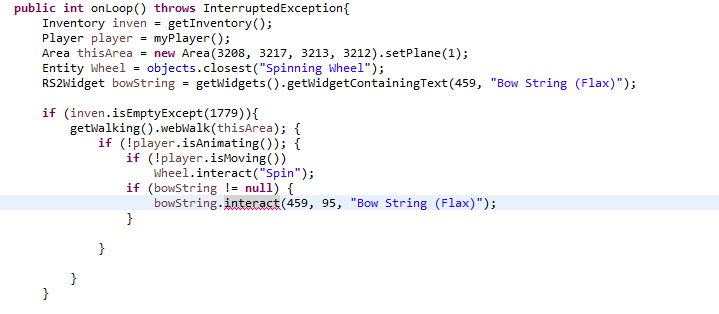
I tried all of these and when it opens the menu to choose what to spin, it just hovers over bow string. How retarded am i?
-
interact(int rootId, int childId, java.lang.String action) is what I am trying to use and nothing is underlined if I leave out the integers, but it doesn't interact with the widget. If I add the ints then I get an error. Not 100%^ sure what I'm doing wrong here
-
So I know that I can make my script bank by mapping out the corner coordinates and designating it as an area, but is there any other way to do it where I wouldn't have to get the coordinates to map the bank?
-
Well I tried to follow by looking at the pictures on some of the forum topics but it was harder for me to understand it all compared to a video. I'm just using the video as like reference I guess to learn to use the API
-
Alright thanks guys! I was watching an old video because I am trying to learn how to properly use the API with a video representation because it is easier to learn that way


