



Jump to content
View in the app

A better way to browse. Learn more.

OSBot :: 2007 OSRS Botting

A full-screen app on your home screen with push notifications, badges and more.

To install this app on iOS and iPadOS
  1. Tap the Share icon in Safari
  2. Scroll the menu and tap Add to Home Screen.
  3. Tap Add in the top-right corner.
To install this app on Android
  1. Tap the 3-dot menu (⋮) in the top-right corner of the browser.
  2. Tap Add to Home screen or Install app.
  3. Confirm by tapping Install.

Daddy Jake

Members
  • Joined

  • Last visited

  1. yeah dude relax his not charging -.-
  2. Daddy Jake replied to iRage's topic in Archive
    ^^ true
  3. and how u do that?
  4. none fk that lol
  5. i hate that bitch she swears shes the shit fucking rachet bitch
  6. for some reason it doesnt let me post there i saw someone post a account here to so i was let me post mine to lol
  7. rest and piss
  8. Daddy Jake replied to vertigo's topic in Runescape
    Lucky bastard
  9. dammm thats bank if u think is useless ill take it lol
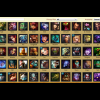
Account

Navigation

Search

Configure browser push notifications

Chrome (Android)
  1. Tap the lock icon next to the address bar.
  2. Tap Permissions → Notifications.
  3. Adjust your preference.
Chrome (Desktop)
  1. Click the padlock icon in the address bar.
  2. Select Site settings.
  3. Find Notifications and adjust your preference.
