Jump to content
View in the app

A better way to browse. Learn more.

OSBot :: 2007 OSRS Botting

A full-screen app on your home screen with push notifications, badges and more.

To install this app on iOS and iPadOS
  1. Tap the Share icon in Safari
  2. Scroll the menu and tap Add to Home Screen.
  3. Tap Add in the top-right corner.
To install this app on Android
  1. Tap the 3-dot menu (⋮) in the top-right corner of the browser.
  2. Tap Add to Home screen or Install app.
  3. Confirm by tapping Install.

Batman The Dark

Members
  • Joined

  • Last visited

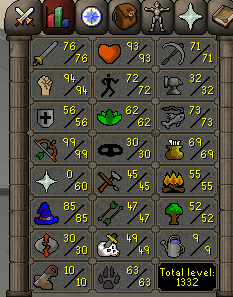
  1. I got 99 range start main for cheap.
  2. The account is perma muted since 2011 and has a two day ban
  3. Wtb

    Batman The Dark replied to Flashbacks420's topic in Requests
    I have one msg me
  4. How is this working for everyone, took a break from RS.
  5. Batman The Dark replied to Fruity's topic in Minigames
    yeah I'm having the same problem as soon as i set everything and hit start the bot stops.
  6. Batman The Dark replied to Fruity's topic in Minigames
    got my 1st ban, but its my fault I was going non stop with no breaks. It was only a two day ban ^^ 99 range and str call that a win.
  7. Batman The Dark replied to Fruity's topic in Minigames
    almost 99 range using rune arrows LOL
  8. I can't wait to try this out later next week.
  9. tyyy
  10. its going to be gone ;c
  11. Swapped 5bil ish to rs3 LOL
  12. Batman The Dark replied to Fruity's topic in Minigames
    amazing script do not regret buying this at all 100% flawless

Account

Navigation

Search

Configure browser push notifications

Chrome (Android)
  1. Tap the lock icon next to the address bar.
  2. Tap Permissions → Notifications.
  3. Adjust your preference.
Chrome (Desktop)
  1. Click the padlock icon in the address bar.
  2. Select Site settings.
  3. Find Notifications and adjust your preference.