TheAnswer
Members
-
Joined
-
Last visited
Everything posted by TheAnswer
-
thanks for this!!!!
-
-
A 2 day ban for July @ the following: > Varrock - Minning Essence > Port Phasmatys - Smithing Note: World Population (50 - 200) Time: Mine: > 01:00 to 3:00 [ 28 July - NZST ] Converted: > 13:00 to 15:00 [ 27 July - UTC (GMT) ] > 09:00 to 11:00 [ 27 July - EDT ]
-
-
-
-
wow well done!!!
-
thanks guys
-
-
-
Yeah it was needed lol
-
yeah sorry dam formatting in this is pretty bad
-
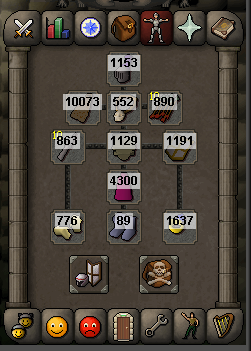
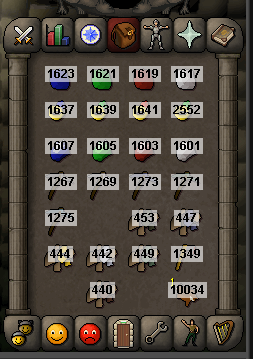
This code will show all the item IDs in your inventory and equipment when you view that tab. Imports & Overriding... >>> Add imports: import org.osbot.script.*; import org.osbot.script.rs2.model.Item; import org.osbot.script.rs2.ui.EquipmentSlot; import org.osbot.script.rs2.ui.EquipmentTab; import org.osbot.script.rs2.ui.Tab; import java.awt.*; >>> The override: @Override public void onPaint(Graphics g) { } Step 1 In the onPaint method cast the current Graphics to 2D Graphics and call the method showItemIDs. @Override public void onPaint(Graphics g) { Graphics2D g2 = (Graphics2D)g; showItemIDs(g2); } Step 2 Add the following methods... public void showItemIDs(Graphics2D g2) { Composite old = g2.getComposite(); if(currentTab() == Tab.INVENTORY) { Item[] items = client.getInventory().getItems(); for(int i = 0; i < items.length; i++) { if(currentTab() != Tab.INVENTORY) return; if(items[i] != null) { Rectangle r = client.getInventory().getDestinationForSlot(i); if(r != null) drawItemData(g2, r, items[i].getId()); } } } else if(currentTab() == Tab.EQUIPMENT) { for(Item item : equipmentTab.getItems()) { if(currentTab() != Tab.EQUIPMENT) return; if(item != null) { Rectangle r = client.getInterface(387).getChild(equipmentTab.getSlotForId(item.getId()).childId).getRectangle(); if(r != null) drawItemData(g2, r, item.getId()); } } } g2.setComposite(old); } private void drawItemData(Graphics2D g2, Rectangle r, int id) { int nx = (int) r.getX(), ny = (int) r.getY(), h = g2.getFontMetrics().getHeight(); String s = "" + id; g2.setComposite(AlphaComposite.getInstance(AlphaComposite.SRC_OVER, 0.60f)); g2.setColor(Color.WHITE); g2.fillRect(nx + (int) ((r.getWidth() - g2.getFontMetrics().stringWidth(s)) / 2) - 2, ny + h / 4, g2.getFontMetrics().stringWidth(s) + 4, h); g2.setComposite(AlphaComposite.getInstance(AlphaComposite.SRC_OVER, 1.00f)); g2.setColor(Color.BLACK); g2.drawString(s, nx + (int) ((r.getWidth() - g2.getFontMetrics().stringWidth(s)) / 2), ny + h); } The Result...
-
I'm currently working on a fix and testing my new version atm...
-
-
Thanks!!!
-
-
Thanks for the update nice work. I had a error running my script thought it was a injection problem but I see you have added a Color class for OSBot. I was using Color from java.awt.* and is interfering with OSBot Color. Just thought I would let pplz know
-
Amazing!!!!
-
Cheers!!!
-
Yeah, i've been having the same problem