






digdig18
Members
-
Joined
-
Last visited
Everything posted by digdig18
-
You should make an abstract class so return item values... I'm not sure if java sleep thread to return the response
-
Only osbot devs can make that work, since the way we notice if a npc is poisoned is noticing the green hitmark that is a mask sent by server on npc update
-
Nice updates
-
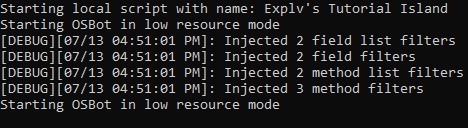
Found More bugs, after "Starting OSBot in.... " prompt it just stops running, not exit code, nothing Found more about this. It's about Escaping ' and " the script name shouldn't be spaces if you want run. But the Random exit still remains
-
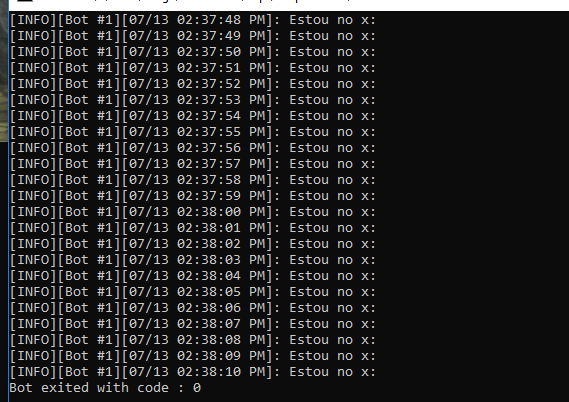
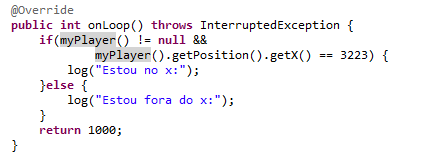
No Pattern... It run flawless but out of nowhere, it gives me exit code java -jar "osbot 2.5.8.jar" -debug 5005 -login user:pass -bot user:pass:0000 -script ScriptBotWeb:0 -allow nointerface
-
This script is getting detected, that was my one and only script I ever used in my account... I did everything legit, followed the good practices, never left bot running while I'm afk.... 3 days after using got banned
-
Use a shared VPS so you can upgrade it within time. Linux is cheaper (CentOS, fedora, etc...) , then learn how to use it if you don't know and be happy
-
Trade with caution
-
-
Good day, I'm currently releasing my first script, together with my framework! Feel free to contribute and leave feedback https://github.com/digdig18/oscript/releases/tag/1.0 Start anywhere, the task system is based on conditions that will start accomplishing the objectives during the runtime Requeriments -An f2p account It’s recommended to follow good manners of botting, the only way you can get banned on this is being tracked
-
I'm just looking forward price crash, I do care for Scripter rank too, but I don't see a way out this. Please let me know how can we release a script without effect the average of reward by the amount of users
-
bump
-
.
-
Well I can't get mirror mode running Initializing mirror client bot... Does anyone had similar problem? Also there's a issue with proxys. The bot freezes
-
I tried everything, believe me haha client.moveMouse(new RectangleDestination(coordsx),(cordsy),(widht),(height)),true); For random, i don't care about the location it will be. but when i try to set specified mouse coords it , never works, always appear in a differente location, i think is because of widht or something...
-
I want to make mouse move to especified location at screen, i'm having trouble with methods All help will be aprecciate!
-
Yes mr thelegacy0, it should pick a random number between 1-4 (i have 4 coords), and thank's ! I'm surprised with your lean code, probably i will use this, thanks for the attention.
-
I can't get it work, building a method for getting random coords Positions, but it never works, all help will be aprecciate import java.util.ArrayList; import java.util.Random; import org.osbot.script.rs2.map.Position; public class testa { public static void main(String[] args) { // TODO Auto-generated method stub ArrayList<Position> tree = new ArrayList<>(); tree.add(new Position(2827,3087,0)); tree.add(new Position(2827,3036,0)); tree.add(new Position(2826,3087,0)); tree.add(new Position(2826,3085,0)); for(int i = 0; i < tree.size(); i++){ Random r = new Random(); i = r.nextInt(i); tree.get(i); System.out.println(i); } } }


