Bronzion
Members
-
Joined
-
Last visited
-
Looks good, can I get a trial please!
-
20M, have sythe rep. Bronzion#4240
-
- Script name: Khal Wintertodt - trial length 24 hours - Reason for trial: Will 99% buy just want to test first - Are you ging to give feedback on the script? As always yes! Thanks
-
Thanks for the trial. Solid script! i'm sure i'll be picking it up soon!
-
- Script name Khal Mort Myre Fungus - trial length: 24 Hours - Reason for trial: comparing some MMF scripts, heard good things from this one! - Are you ging to give feedback on the script? Yep! Thanks
-
Could I have a trial for Perfect Magic AIO please
-
Feedback from trailing the script for 24H: Great script, love everything about it. Suggestions: Ability to edit the settings while the bot is running? Ability to chain settings together i.e. trees in lummy to 15, oak to 30 etc Ability to save custom settings It is possible they exist and I missed them. 10/10 script i'm sure i'll be buying it with RSGP in the near future. Thanks again!
-
Script name Khal Woodcutter - trial length: 1-2 days (if possible) - Reason for trial Your work comes highly recommended. I'd love to try the script before I buy it. - Are you going to give feedback on the script? Yep! Any feedback is better than no feedback.
-
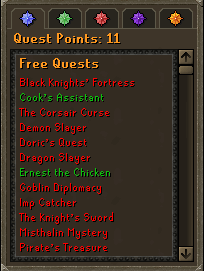
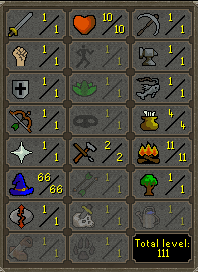
Not sure on how much I would get for these. Given I have no reputation I am happy to accept the price will be lower. 10 hp, 66 mage, passed all f2p restrictions and happy to provide the throw away registered emails along with the account.