






Nicholas99GHz
Members
-
Joined
-
Last visited
-
Thanks for the guide! Easy to follow & was able to get mine working in like 30 mins
-
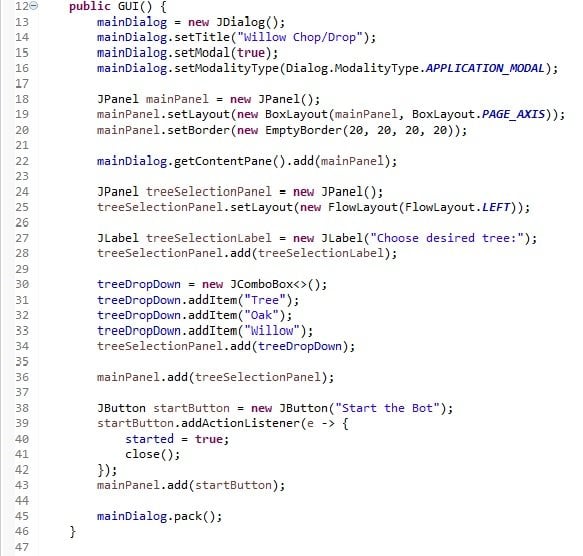
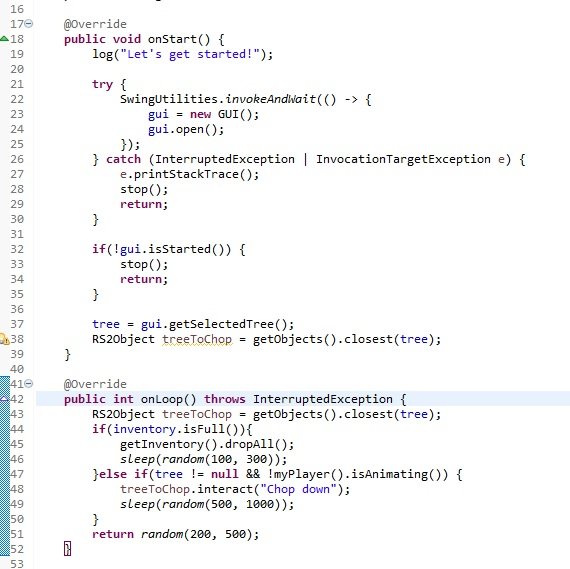
Wow thanks so much for taking the time to make this guide. I ran into trouble with the GUI at the very end (the enum Tree objects were giving me trouble back in my main class). But here's how I fixed it in case anyone runs into the same issue: I deleted the enum and changed the Tree objects into Strings. Then just add the Strings individually into the JComboBox. GUI Class: Main Class: (i know this may be less efficient/elegeant/conventional... but it seemed much more beginner-friendly to me)
-
Thank you so much for this guide. I've learned a ton from both yours and Explv's. I just made a super simple willow powerchopper based off your code. It's been great practice for me and really inspired me to start slowly moving towards more ambitious projects. Thanks again!

