






sapo
Members
-
Joined
-
Last visited
-
could I get a trial?
-
Could I get a trial? Thanks
-
Can i have a trial please
-
I did 1 farm round and got banned, not sure why. used residential proxy, did varying content, hand trained early farming/construction levels ect Anyways, here is the final log: [INFO][Bot #1][09/09 01:35:27 AM]: herb patch: Catherby [INFO][Bot #1][09/09 01:35:27 AM]: planting seed [INFO][Bot #1][09/09 01:35:27 AM]: clicking patch [INFO][Bot #1][09/09 01:35:29 AM]: planted patch [INFO][Bot #1][09/09 01:35:30 AM]: herb patch: Catherby [INFO][Bot #1][09/09 01:35:30 AM]: patch is full - updating farming timers [INFO][Bot #1][09/09 01:35:31 AM]: next farming break: 86 [INFO][Bot #1][09/09 01:35:31 AM]: starting break [INFO][Bot #1][09/09 01:35:31 AM]: next break duration: 5159388 [INFO][Bot #1][09/09 01:35:31 AM]: waiting for break handler [INFO][Bot #1][09/09 01:35:31 AM]: started break [INFO][Bot #1][09/09 01:35:32 AM]: starting break [INFO][Bot #1][09/09 01:35:32 AM]: next break duration: 5158783 [INFO][Bot #1][09/09 01:35:32 AM]: waiting for break handler [INFO][Bot #1][09/09 01:35:32 AM]: started break [INFO][Bot #1][09/09 01:35:32 AM]: Started random solver : [INFO][Bot #1][09/09 01:35:32 AM]: break manager logging out [INFO][Bot #1][09/09 03:01:31 AM]: Random solver exited : [INFO][Bot #1][09/09 03:01:31 AM]: Started random solver : Auto Login [INFO][Bot #1][09/09 03:01:36 AM]: Successfully logged in, waiting for welcome screen. [DEBUG][Bot #1][09/09 03:01:41 AM]: Login Code: 4 [ERROR][Bot #1][09/09 03:01:41 AM]: Your account has been disabled, stopping script. [INFO][Bot #1][09/09 03:01:41 AM]: Terminating script Stealth Passive Goldfarmer... [INFO][Bot #1][09/09 03:01:41 AM]: changing window title [INFO][Bot #1][09/09 03:01:41 AM]: saving progress [INFO][Bot #1][09/09 03:01:41 AM]: Script Stealth Passive Goldfarmer has exited!
-
-
I would love to try this
-
Ill get u the information, right now i continued running it without ge stocking, but will put it on later
-
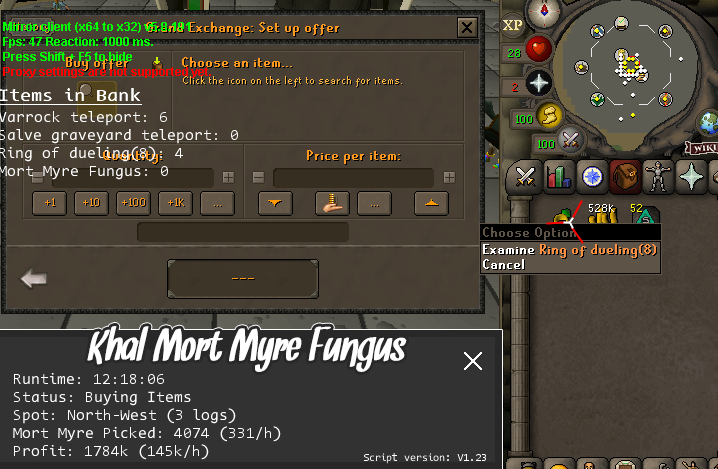
Banking still doesnt work. Now it buys everything, closes GE and then just stands there with the mouse in an empty inventory.
-
Had it on, on 2 accounts, both got stuck at ge buying screen, right clicking duel ring all the time
-
Hi, I'm new in this. Lets say I wan't to make a few bots botting for money. What is the safest way to mule it? And is it in general safe to mule? Or is it just gonna be a chainban?
-
Yeah did that. Basically what I did was; take a ''fresh'' pc, open VPN, connect to ip of choice --> create account --> fill in details in osbot --> start script and next I'm locked. Any other tips?
-
Bought this to try it out, so far 6/6 accounts have been locked directly after tutorial. I tried different IPs with my VPN and tried verifying my email once, all resulted in the same.. locked accounts.. Any tips?
-
So I'm new to this all, but what if I want to bot like 5 accounts at a time and I want them all member? Is the best way to buy osrsgp on 1 of the bots and then bond all of them? Any suggestions please?


