




Jump to content
View in the app

A better way to browse. Learn more.

OSBot :: 2007 OSRS Botting

A full-screen app on your home screen with push notifications, badges and more.

To install this app on iOS and iPadOS
  1. Tap the Share icon in Safari
  2. Scroll the menu and tap Add to Home Screen.
  3. Tap Add in the top-right corner.
To install this app on Android
  1. Tap the 3-dot menu (⋮) in the top-right corner of the browser.
  2. Tap Add to Home screen or Install app.
  3. Confirm by tapping Install.

R12

Members
  • Joined

  • Last visited

  1. My stats are below click link. https://imgur.com/uEeCc9A need to get this done on my low level account please post prices and discord. Need someone hardworking and trustworthy Got loads of work needing done to this account.
  2. R12 replied to R12's topic in Runescape 2007
    thank you for offer. cant deal with a twc user regardless of feedback sorry.
  3. let me know prices and discord
  4. added on discord.
  5. Okay thank you , will wait to see what other offers i get from trusted users.
  6. Looking to get 90 defence done on my account Rules of service No botting allowed somewhat trusted person needed Stats needed 74-90 Defence needed. Please post price below and your contact method.
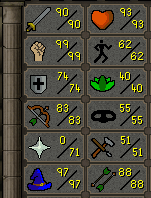
  7. Yes its safe , but paypal shit overall anyway.
  8. R12 replied to Runnwith's topic in Spam/Off Topic
    agreed.
  9. Hi

    R12 replied to shaqir tashevci's topic in Tutorials
    script name?
  10. add my discord R12Services-#2517
  11. 2-3 bots would be safe for 1 ip address. 4 would be pushing it tbh.
  12. Add me on discord please. R12Services-#2517
  13. added you buddy.

Account

Navigation

Search

Configure browser push notifications

Chrome (Android)
  1. Tap the lock icon next to the address bar.
  2. Tap Permissions → Notifications.
  3. Adjust your preference.
Chrome (Desktop)
  1. Click the padlock icon in the address bar.
  2. Select Site settings.
  3. Find Notifications and adjust your preference.