




Jump to content
View in the app

A better way to browse. Learn more.

OSBot :: 2007 OSRS Botting

A full-screen app on your home screen with push notifications, badges and more.

To install this app on iOS and iPadOS
  1. Tap the Share icon in Safari
  2. Scroll the menu and tap Add to Home Screen.
  3. Tap Add in the top-right corner.
To install this app on Android
  1. Tap the 3-dot menu (⋮) in the top-right corner of the browser.
  2. Tap Add to Home screen or Install app.
  3. Confirm by tapping Install.

MagicalDabs

Members
  • Joined

  • Last visited

Everything posted by MagicalDabs

  1. @zuzel111 completed a fire cape service with only 56 range and high melee. Very fast turn around time, and easy to contact through the website / Discord. Would defiantly use again, and recommend to anyone.
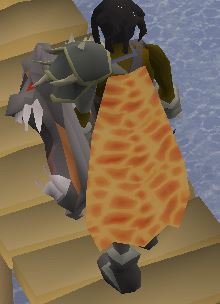
  2. They completed a fire cape service with only 56 range and high melee. Very fast turn around time, and easy to contact through the website / Discord. Would defiantly use again, and recommend to anyone.
  3. Yes I am looking forward to posting a review after the service is completed ?
  4. Looking to get a quote from a trusted vendor for a Fire Cape service OSRS. Account that has 75 Attack 85 Strength 75 Defense 80 Constitution 71 Prayer 56 Range 54 Magic Looking to connect via discord
  5. - Did you add me on Skype or send me a PM? Added you on Discord - What is the requested service? Fire Cape services - Do you agree to the TOS? Yes

Account

Navigation

Search

Configure browser push notifications

Chrome (Android)
  1. Tap the lock icon next to the address bar.
  2. Tap Permissions → Notifications.
  3. Adjust your preference.
Chrome (Desktop)
  1. Click the padlock icon in the address bar.
  2. Select Site settings.
  3. Find Notifications and adjust your preference.