




Jump to content
View in the app

A better way to browse. Learn more.

OSBot :: 2007 OSRS Botting

A full-screen app on your home screen with push notifications, badges and more.

To install this app on iOS and iPadOS
  1. Tap the Share icon in Safari
  2. Scroll the menu and tap Add to Home Screen.
  3. Tap Add in the top-right corner.
To install this app on Android
  1. Tap the 3-dot menu (⋮) in the top-right corner of the browser.
  2. Tap Add to Home screen or Install app.
  3. Confirm by tapping Install.

dcart6995

Members
  • Joined

  • Last visited

  1. Hi, my osbot client login is the same as my forum login, however I cannot login. I get invalid user/pass errors. I'm on the current client version and have tried to change my password. Still can't login.
  2. Trial please?
  3. dcart6995 replied to FrostBug's topic in Minigames
    I've got some questions about your experience botting. Don't want to get banned myself, have you got a skype or discord?
  4. dcart6995 replied to Tom's topic in Mining & Smithing
    Trial please?
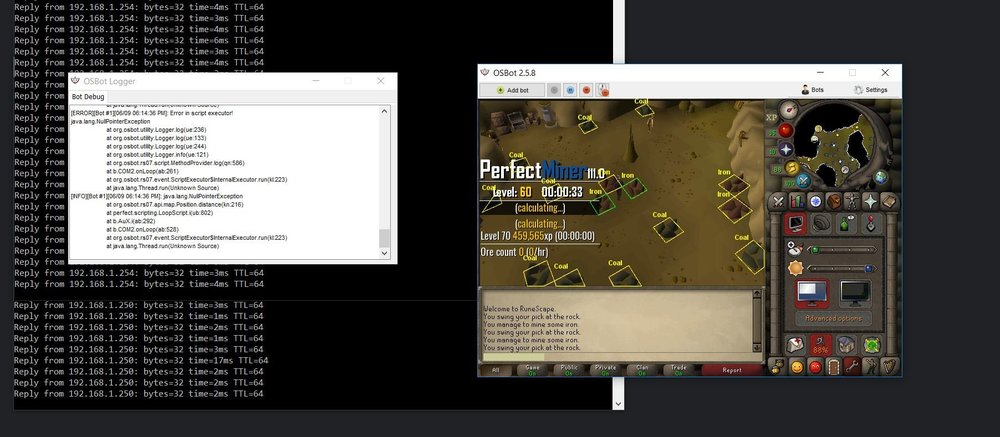
  5. Hi, I'm not able to mine in the mining guild. If I use the select ores option I get the error shown in the log. At this point, nothing mines and the client has to be force closed.
  6. Would you set me up with a trial please? Also, do you think you'd offer any deals or discounts? Maybe combine your bot set in a package?
  7. Trial please?

Account

Navigation

Search

Configure browser push notifications

Chrome (Android)
  1. Tap the lock icon next to the address bar.
  2. Tap Permissions → Notifications.
  3. Adjust your preference.
Chrome (Desktop)
  1. Click the padlock icon in the address bar.
  2. Select Site settings.
  3. Find Notifications and adjust your preference.