






Baconeggandchees
Members
-
Joined
-
Last visited
Everything posted by Baconeggandchees
-
Welcome to my Botting Log! Gonna log my progress and learn from any mistakes I make Used to bot a lot a long time ago, now I'm back it trying to really profit from it Day 0 Day 1 Day 2 Day 3 Day 4 Day 5 Day 6 Day 7 Day 8 Will try to update this thread daily. Thanks for reading!
-
11 years RS experience Looking to become a quester I've done plenty B gloves, MM + DT (13pray), etc Main/zerker fire capes Can pay deposit for highly trusted services Skype: live:rs3ironmanlul
-
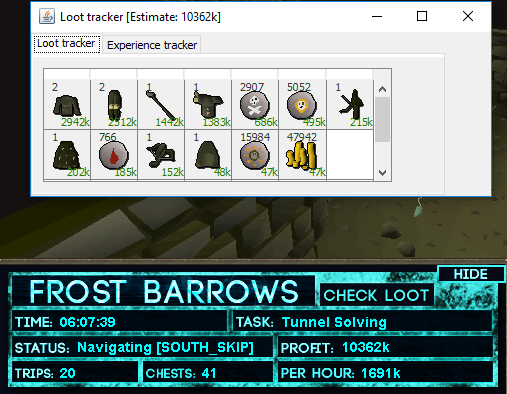
Proggy of an amazing 6h session before I got a 2 day ban
-
Amazing script been running for a couple days now One question though is what rewards potential is everyone going for I read that around either 75% or 88% is ideal what do you think? EDIT: Did 10 chests with each percentage and got more profit with 75%. Would recommend.
-
Have you read & agreed to my ToS*? : Yes Age? : 22 Do you agree to discuss about the deposit? : Yes What is your Skype ? : Added you What are you applying for? (Powerleveller/Quester/Minigames) : Quester, Zerker/main fire capes, Defenders Do you have any experience with a service? : Used to sell dungeoneering leeches in a clan chat for a while If yes, are you willing to supply proof in PM / Skype? :

