




Jump to content
View in the app

A better way to browse. Learn more.

OSBot :: 2007 OSRS Botting

A full-screen app on your home screen with push notifications, badges and more.

To install this app on iOS and iPadOS
  1. Tap the Share icon in Safari
  2. Scroll the menu and tap Add to Home Screen.
  3. Tap Add in the top-right corner.
To install this app on Android
  1. Tap the 3-dot menu (⋮) in the top-right corner of the browser.
  2. Tap Add to Home screen or Install app.
  3. Confirm by tapping Install.

alahkad

Members
  • Joined

  • Last visited

Everything posted by alahkad

  1. Merry Christmas everyone! and goodluck to all
  2. yes, I am using the Stronghold plugin and it still wont attack minotaurs.
  3. Currently trying to run this in the security stronghold against minotaurs, but its not attacking. it picks up the npc, but does not execute
  4. The choose from map option is not working for me, it was working prior to the update either. Perhaps I'm not using it correctly, I click on the option and nothing happens. thanks
  5. i would like a free trial, thanks
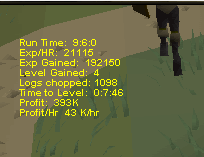
  6. awesome script, ran it on a 60 wc account and got a 9 hour progress report. I'm sure it could run much longer, but i decided to cut it short. if i get a longer one, ill share here.
Account

Navigation

Search

Configure browser push notifications

Chrome (Android)
  1. Tap the lock icon next to the address bar.
  2. Tap Permissions → Notifications.
  3. Adjust your preference.
Chrome (Desktop)
  1. Click the padlock icon in the address bar.
  2. Select Site settings.
  3. Find Notifications and adjust your preference.