






mikeymike
Members
-
Joined
-
Last visited
Everything posted by mikeymike
-
wheres my trial
-
can i have a trial please
-
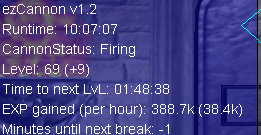
already bought last night and tested it, great script bro. first proggie for ya!
-
-
im trying to cannon an npc, im trying to tell the bot to recharge cannon when low, then run back to safe spot after recharging cannon. I set a safe spot and while it runs to go to cannon it clicks right away to safe spot. Please help
-
I think my trial might have run out, im just now seeing this, can you reactivate?
-
Perfect Warriors, Al Kharid please i think you activated the trial, and i didnt know where it was until someone told me the next day, and now it isn't there. Sorry im new to this, i know where it would be at now. Can i have the trial please?
-
Perfect Warriors, Al Kharid please? and how do i know when you have given the trial? where do i find it?
-
hey can i try out this script? and how do i know its available for 24 hour proggy trial?
-
hey i tried to use it for al-kharid warriors and it just stands there and doesn't do anything. need help
-
hey man, can i try out the perfect al kharid script please? how do you send the trial to me? does it go straight to my collection of scripts?
-
how do i add the script to my collection of scripts?
-
perfect al kharid warrior script, how do i activate it when you like my post? is it sent to my collections list of bots already? and how much is the bot if i end up liking it after 24 hours? i plan on running the bot for a full 24 hours as well



