Jump to content
View in the app

A better way to browse. Learn more.

OSBot :: 2007 OSRS Botting

A full-screen app on your home screen with push notifications, badges and more.

To install this app on iOS and iPadOS
  1. Tap the Share icon in Safari
  2. Scroll the menu and tap Add to Home Screen.
  3. Tap Add in the top-right corner.
To install this app on Android
  1. Tap the 3-dot menu (⋮) in the top-right corner of the browser.
  2. Tap Add to Home screen or Install app.
  3. Confirm by tapping Install.

FourOneTwo

Members
  • Joined

  • Last visited

Everything posted by FourOneTwo

  1. thanks everyone appreciate it
  2. Okay thank you i appreciate it! What about cash wise, if you have any idea? Would be more interested in real money than runescape gold honestly. That is fine about the feedback not in any rush to sell it just curious for now pretty new to the site honestly. I don't know how to gain feedback on here to be honest.
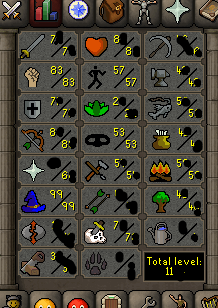
  3. possibly thinking about selling but just curious on a price check for now! appreciate it! 80+ qp about 20m in cash and items noteable items: slayer helm (i) dragon defender
  4. can't seem to find it today. saw it on there the other day now its gone or am i just overlooking things?
  5. This looks awesome! I would love to test this! you can pm me on here if interested thank you!
  6. i alched 55-99 mage on my main using garyshood Auto Clicker running it almost non stop without ever receiving a ban!
  7. you giving out free trials? i am really interested in this script would like to try first. thank you!

Account

Navigation

Search

Configure browser push notifications

Chrome (Android)
  1. Tap the lock icon next to the address bar.
  2. Tap Permissions → Notifications.
  3. Adjust your preference.
Chrome (Desktop)
  1. Click the padlock icon in the address bar.
  2. Select Site settings.
  3. Find Notifications and adjust your preference.