





Smuggz
Members
-
Joined
-
Last visited
-
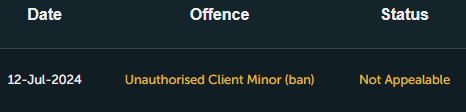
Have been building my own script so a lot of logging in and out to refresh the new builds, Only script I used was Stealth Quester and my own personal script, never saw this ban before, client is detected or what? no mirror mode straight stealth
-
Been having this problem for a few days, tried dealing with it now it's getting a little out of hand the right hand where you choose what script gets all bugged out, then when I start the script (any script) it bugs out also and I can't see what settings I'm choosing, when I finally get it started the bot runs perfectly fine just the UI is really annoying https://imgur.com/a/DP5YVgO
-
-
Used all your script and never been disappointed, set this up to splash/stun at the monk of zammy and only used it 2 hours, next again day I was banned
-
Looking for someone to level my str from 52-80 without gaining any hp levels, currently 42 hp
-
-
Only want someone to cannon only the organized crime, don't want to gain any hp levels at all just str from the books Stats Needed 52-80 Str Current Stats 70 Range 41 Hp
-
Online
-
Online
-
Online
-
Online!
-
Online
-
online
-
online
-
online



