





no face
Members
-
Joined
-
Last visited
-
Hey can I get a trial please!
-
-
bump
-
bumpy wumpy
-
bump still for sale
-
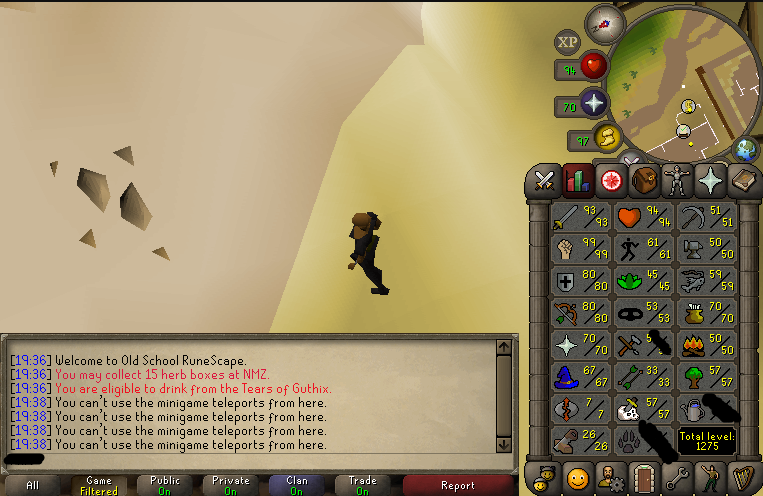
- Rare 3 character name - 1. Pictures of the account stats 2. Pictures of the login details 3. Pictures of the total wealth (if there is any) 4. Pictures of the quests completed - (176 Quest Points - Barrows Gloves) 5. The price you will be starting bids at 70m 6. The A/W (Auto-win) for your account 110m 7. The methods of payment you are accepting OSRS GP 8. Your trading conditions Prefer higher feedback if possible 9. Pictures of the account status 10. Original/previous owners AND Original Email Address Upon purchase will provide the original email.

-
bump need a price
-
-
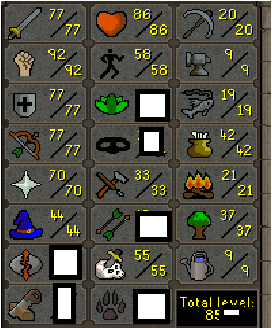
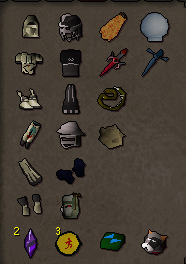
Can someone PC what this account can go for? -mith gloves, graceful, full void, d defender, firecape, whip vine has a rare 3 letter name. CB104.
-
-
-
-
230m
-
-
68m


