
shern
Members
-
Joined
-
Last visited
Everything posted by shern
-
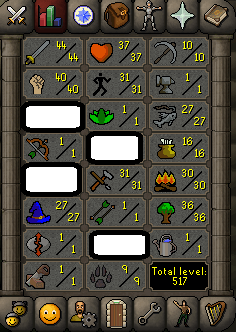
THIS IS A BOTTED SERVICE The service is simple, you provide a fresh level 3 account with bond and cash for the service. The majority of the service is botted hence the price is much cheaper than other questers/skiller. You can expect your account to have these stats once finished. Some stats may vary as each account is made in the safest possible way. Castle Wars Service 175k per ticket. Contact me through private message or my Discord. General osbot TOS applies 1. You may not log into the account during a service unless you have permission from the owner of the service, doing so will result in the termination of the service with NO Refund. 2. You MUST NOT change the details of the account until the service has been completed, doing so will result in a void service with NO Refund. 3. If there are any items required for the service, it is between you and the service owner to come to an agreement on who covers them 4. You MUST change your password after the service is completed 5. If you have any substantial wealth on the account, it is your responsibility to protect it (Either Bank Pin/Transfer Trade) 6. Once the service is complete you must leave Feedback for the relevant parties involved 7. You MUST Post on the service thread to acknowledge their individual T.O.S and start the service 8. By ordering you accept that bans are possible and I am not liable for any bans/mutes during the order

-
Guess it got banned xD
-
Yeah it generally means you created the account on one IP then switched to a different one straight after. They automatically pick that up.
-
Would love to see a link to your portfolio
-
Thanks, weekends are the best for botting
-
From my experience they won`t ban the main. I bot heaps of accounts on my home IP and play my main and have had no bans on the main.
-
READ THE THREAD BEFORE POSTING Accounts must meet this criteria More than 300+ total level No current/past offenses 7 Or more stats over level 1 I will not be paying over 10M OSRS GP PER ACCOUNT(PAYPAL ALSO AVAILABLE) Private message me for fastest response!
-
PM me the quote Ive already had a few PMs Ty
-
Need about ten accounts 1-75 ranged pm me quotes
-
im looking for offers becuase i have some special requests
-
I want a personal host and special features
-
Need someone to find a build of OSRS with inferno and host it for practice. I will pay (you need to be some-what experienced in coding and be able to prove it)
-
about tree fiddy
-
-
-
When can you start? Please provide a list of supplies you need too
-
quote me , im not PMing you.
-
Yes I have a list that you can use.
-
Need a fresh account from Tutorial Island to Fossil Island - Requirements 100 Kudos - You will need to get all of these. Digsite Quest - This and all pre quests. Gone to Zeah at least once
-
No one would buy it off you but 50m maybe
-
-
You will need to get a static IP usually held by your ISP. Ring them up. If you're looking to change your IP by restarting your router because you're IP flagged, don't. It won't work.
-
-
tbh around 15m takes like no effort to make these accounts.
-
exp per hour you need to enable input (mouse control) again and click on the skills picture in the bottom left. telegrabbing works for me if ticked.