






YoungWinner
Members
-
Joined
-
Last visited
Everything posted by YoungWinner
-
that's still an email though.. not original login
-
Are original username accounts worth anything??
-
-
-
Title says all. Selling a $25 Visa Gift card in exchange for 07GP. Looking for 50m
-
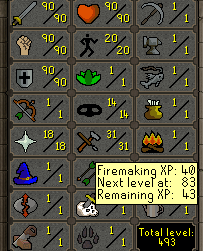
https://prnt.sc/qcobor Value on this?
-
I'm back better than ever 😉
-
Looking to get 40m. Talking on Skype.
-
Looking to buy around 30m. Added Skype.
-
Title says all, using PayPal because it’s all I have. Will pay for MM if needed.
-
-
-
added
-
i need osgp... skype name?
-
title says all, Only using paypal or skrill... pm me
-
100M
-
$1m / PayPal. Just need some extra mills
-
Dust said the dispute could be dropped since I was hacked.
-
That's the thing... I don't have no keylogger nor use the same password for other forums..
-
Are Y'all fucking serious? I don't use the same password for every single forum. My password has been the same on this forum since I made an account. maybe if OSBot didn't have a leaked database this wouldn't be a problem... Now I'm getting banned for something I didn't even fucking do... This is pathetic.
-
How is it my responsibility when my password was probably from a leaked database? Like I do nothing sketchy on my PC, I don't click on no stupid links, barely even add people on skype.
-
I was hacked and I have no idea how.
-
Bump Can do UKBT, BTC WU
-
I was offered 5m for one of mine.
-
